
A rack-level cabling BOM for an AI server room should list more than cable type and total length. Each rack should have its own fiber uplinks, copper management links, patch cords, patch panels, cable managers, labels, spare ports, test requirements and packing notes. This helps project teams install GPU servers, switches, storage and management devices without last-minute cable shortages or messy routing. For AI server rooms, rack-level BOM planning is especially important because high-density equipment, airflow limits, service access and future expansion all depend on clean, traceable and correctly sized cabling.
Why rack-level BOM planning matters in AI server rooms
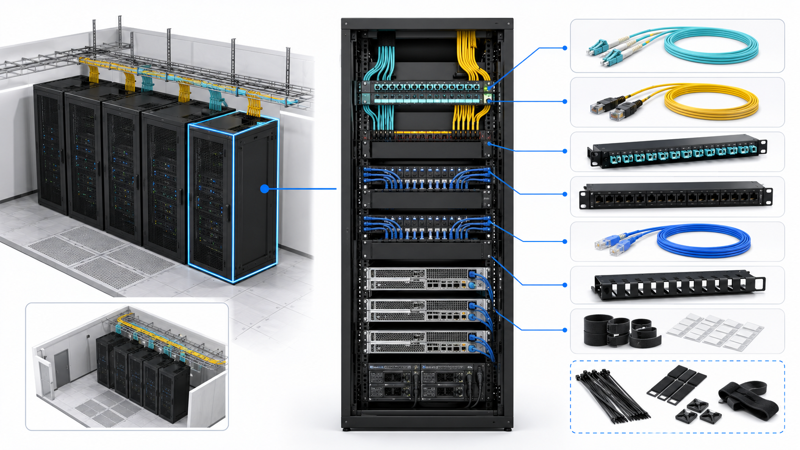
AI server rooms are often built around dense racks of GPU servers, storage, network switches and management devices. Even when the room is smaller than a hyperscale data center, the cabling can still become complex. Each rack may need fiber uplinks, copper management ports, patch cords, cable managers, labels, spare ports and a clear route to the network or cross-connect area.
A room-level BOM may show the total number of cables, but it does not tell the installation team what each rack needs. A rack-level BOM solves this problem by grouping materials according to rack position, system function and installation sequence.
This is important because AI infrastructure is moving toward rack-scale architectures. Public examples such as NVIDIA rack-scale AI systems show why rack-level planning is becoming more important than a simple cable count. The final BOM should still follow the actual project design and equipment documentation.
What should each rack-level BOM include?
| Rack BOM Area | What to List | Why It Matters | Risk If Missing |
|---|---|---|---|
| Rack role | Compute rack, switch rack, storage rack, management rack or mixed rack | Determines cable type and quantity | Supplier may quote a generic cable set |
| Fiber uplinks | Fiber type, connector, length, patch panel and port count | Supports backbone and switch uplinks | Wrong connector or insufficient fiber count |
| Copper management | Copper cable, patch cords, panel ports and device count | Supports OOB management, console and monitoring | Servers installed without management access |
| Patch cords | Fiber and copper patch cord length, color and connector | Keeps rack patching clean and traceable | Messy overlength cables or too-short links |
| Patch panels | Fiber cassette, copper panel, port density and rack unit | Supports structured patching and service access | Direct patching becomes hard to maintain |
| Cable managers | Horizontal, vertical, finger duct, Velcro ties and bend support | Protects airflow and bend radius | Cable congestion blocks airflow or access |
| Labels | Rack ID, device ID, port ID, cable ID and route record | Supports troubleshooting and handover | Technicians cannot trace cables |
| Spare capacity | Reserved ports, spare fibers, spare patch cords and labels | Supports growth and repair | Every change requires urgent purchasing |
| Packing note | Materials grouped by rack, zone or phase | Speeds installation and site checking | Correct materials arrive in wrong sequence |
Define rack role before listing cables
The first step is to define what each rack does. A compute rack does not need the same cable mix as a network rack. A storage rack may require different uplinks and management ports. A small AI server room may also have a mixed rack where compute, switching and storage equipment share one cabinet.
The rack role should be defined before the cable list is created. Otherwise, the BOM may contain enough total cable length but the wrong distribution by rack. This is one of the most common reasons why installation teams discover missing patch cords, wrong lengths or insufficient panel ports during deployment.
| Rack Role | Typical Equipment | Main Cabling Needs | BOM Focus |
|---|---|---|---|
| GPU compute rack | GPU servers, management ports, power and cooling connections | Fiber uplinks, copper management, short patch cords, labels | Port count, airflow, service access |
| Network switch rack | Spine / leaf switches, patch panels, cable managers | High-density fiber patching, structured cable routing | Connector type, polarity, patch panel density |
| Storage rack | Storage nodes, switches, management ports | Fiber or copper links depending on design, management cabling | Link function and device mapping |
| Management rack | OOB switches, console devices, monitoring equipment | Copper patching, panels, labels, spare ports | Traceability and easy maintenance |
| Mixed AI lab rack | Servers, switch, storage and management devices in one cabinet | Short fiber and copper patching, compact cable management | Avoiding congestion and overlength cables |
| Expansion rack | Reserved space for future equipment | Spare ports, spare fibers, labels and route plan | Future capacity without redesign |
Plan fiber uplinks and patching items per rack
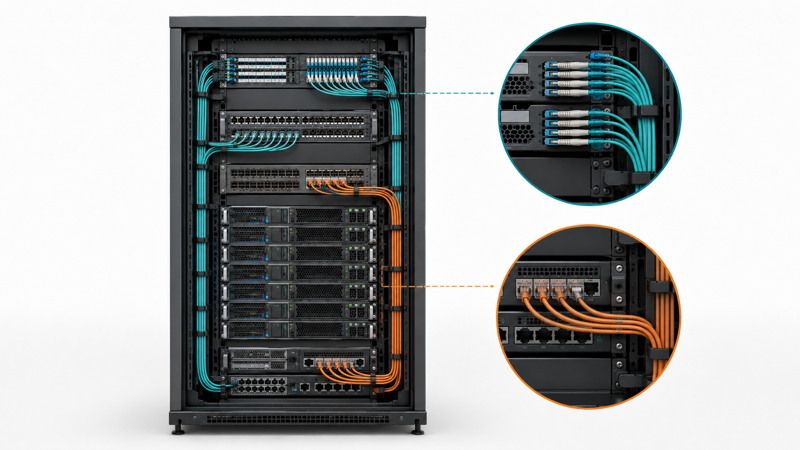
Fiber cabling is often used for rack uplinks, switch-to-switch links, storage network links, or connections back to a distribution area. The rack-level BOM should define every fiber item by rack instead of only listing total trunk length.
For each rack, the BOM should specify the fiber type, connector type, polarity, length, patch panel port, cassette type if used, and spare fibers. If the project uses MPO/MTP, polarity and gender should be confirmed by the system design. If the project uses LC duplex patching, patch cord length and color should be controlled to avoid messy front-of-rack routing.
| Fiber Item | What to Specify Per Rack | Supplier Should Confirm | Installation Value |
|---|---|---|---|
| Fiber route | Rack ID, patch panel ID, destination rack or distribution area | Route-based length and service loop | Prevents too-short or excessive cable |
| Fiber type | Multimode or single-mode based on design | Required equipment and distance | Avoids wrong media selection |
| Connector | LC, SC, MPO/MTP or project-defined connector | Transceiver and panel compatibility | Reduces connector mismatch |
| Polarity | Method A / B / C or project-defined polarity | System design and cassette type | Prevents link failure |
| Patch panel | Rack unit, port count, cassette or adapter type | Front/rear access and density | Improves serviceability |
| Patch cords | Connector, length, jacket, color and quantity | Actual switch-to-panel distance | Reduces rack clutter |
| Spare fibers | Reserved fibers per rack | Future expansion plan | Avoids re-pulling cable later |
| Test record | Insertion loss, polarity and link test if required | Project acceptance requirements | Supports handover |
Plan copper management and monitoring links per rack
Copper cabling is still important in AI server rooms. Even when high-speed AI traffic uses optical links or specialized interconnects, copper structured cabling may still be used for management networks, console access, monitoring systems, facility interfaces, KVM, security devices or short-distance access ports.
The rack-level BOM should separate copper management cabling from high-speed AI fabric connections. This avoids confusion between structured copper cabling, such as copper data cable and patch cords, and specialized short-reach interconnect assemblies used by certain equipment platforms.
| Copper Item | Typical Rack Use | What to Specify | Risk If Missing |
|---|---|---|---|
| Copper data cable | Management or access network | Category, shielding, jacket, route | Under-specified cable may not meet project needs |
| Copper patch cord | Device-to-panel or switch-to-panel patching | Length, color, boot type, category | Mixed lengths create rack clutter |
| Patch panel | Rack patching and port organization | Port count, shielded / unshielded, rack unit | Port shortage or grounding mismatch |
| Keystone / module | Field termination or modular patching | Category and compatibility | Termination mismatch |
| OOB management link | Server management, console or monitoring | Device count and port mapping | Hard-to-access servers after installation |
| Labeling | Cable ID and port ID | Label position and format | Difficult troubleshooting |
| Spare patch cords | Replacement and expansion | Length and quantity by rack | Delayed maintenance |
Include patch cords, cable managers and labeling rules
Patch cords are often underestimated in AI server room BOMs. Buyers may calculate trunks and main cable runs but forget short patch cords, color rules, spare patch cords or cable managers. In rack-level deployments, these small items determine whether the rack is easy to maintain.
The BOM should define patch cord length by rack location. A 0.5 m patch cord may work inside a patch panel zone, while a 3 m cord may be needed between equipment areas. Too-short cords create installation stress, while too-long cords block airflow and make tracing difficult.
Cable managers should also be listed as BOM items, not treated as optional accessories. Horizontal managers, vertical managers, bend-radius support, Velcro ties and label holders can make the difference between a clean rack and an unserviceable rack.
| Item | BOM Detail | Buyer Should Decide | Why It Matters |
|---|---|---|---|
| Fiber patch cord | Connector, polarity, length, color, quantity | Which patching zones need which length? | Prevents overlength loops |
| Copper patch cord | Category, length, color, boot style, quantity | Is the link for management, access or monitoring? | Makes link function visible |
| Horizontal cable manager | Rack unit and position | Where will patch cords cross the rack? | Keeps front patching tidy |
| Vertical cable manager | Left / right side, width, capacity | Which side should cable bundles run? | Protects airflow and access |
| Velcro ties | Quantity per rack | How often should cable bundles be tied? | Avoids over-tightening and damage |
| Label holder | Cable label, port label, rack label | What naming rule will be used? | Supports handover and troubleshooting |
| Spare set | Extra cords, labels, ties and clips | What should be stored with each rack? | Supports quick replacement |
Plan spare capacity and maintenance items
A rack-level BOM should include spare capacity. This does not mean overbuying everything. It means identifying which items are difficult to add later and reserving a practical amount before installation.
Spare fibers, spare patch panel ports, additional copper management ports and extra patch cords can reduce future downtime. Spare labels, Velcro ties, dust caps and adapter covers are also useful for maintenance. In AI server rooms, where equipment may be upgraded or reconfigured quickly, the cost of missing small items can be higher than the item itself.
The spare ratio should be decided by the project designer or integrator. The supplier can help check whether spare items are included, but the supplier should not decide capacity planning alone.
Use rack-based packing for easier installation
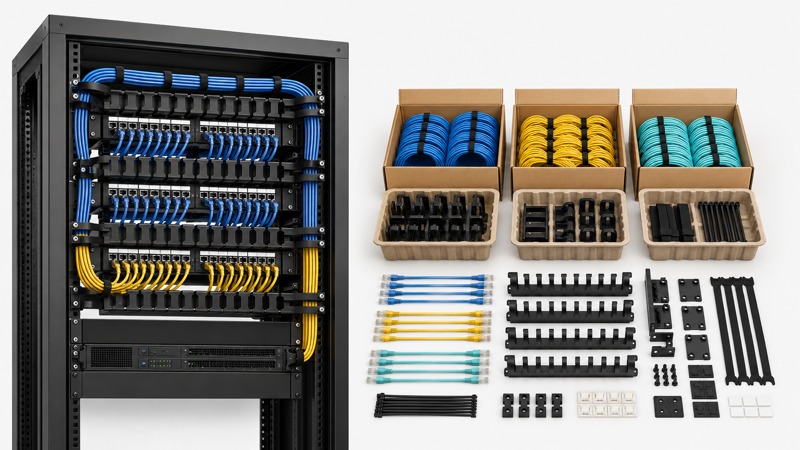
Rack-level BOM planning should also affect packing. If all cables arrive in one mixed shipment, the installation team may spend hours sorting materials. For larger AI server room projects, packing by rack, zone or project phase can save time and reduce site mistakes.
For example, Rack A01 may have its own fiber patch cords, copper patch cords, labels and accessories packed together. Network rack materials may be packed separately from compute rack materials. Spare items may be packed as a maintenance kit.
This is especially useful for distributors and contractors who need to deliver materials to multiple sites or phases. The RFQ should state whether rack-based packing, barcode labels, neutral packing or project labels are required.
| Packing Requirement | What to Ask Supplier | Why It Helps |
|---|---|---|
| Pack by rack | Group cables and accessories by rack ID | Reduces sorting time on site |
| Pack by system | Separate fiber, copper, management and accessories | Prevents mixing functions |
| Pack by phase | Deliver phase 1, phase 2 and spare items separately | Supports staged installation |
| Label carton | Rack ID, system type or project code | Helps warehouse and site teams |
| Include spare kit | Extra patch cords, labels, ties, dust caps | Supports maintenance after handover |
| Keep document pack | Datasheet, packing list, test report if available | Supports handover and inspection |
| Confirm packaging length | Patch cord length, roll length or trunk length | Prevents installation mismatch |
Rack-level RFQ checklist before supplier quotation
Before sending an RFQ, buyers should prepare a rack-level table instead of only sending a room-level material list. The table should include rack ID, rack role, equipment type, port count, fiber links, copper links, patch panels, cable managers, labels, spare items and packing notes.
The RFQ should also explain what is already confirmed and what still needs supplier review. If the rack layout is not final, the buyer should state that lengths and quantities are preliminary. If a product needs a certificate, datasheet or test record, this should be requested before quotation.
| RFQ Field | Example Information to Provide | Supplier Should Confirm |
|---|---|---|
| Rack ID | A01, A02, Network Rack 01 | Material grouping by rack |
| Rack role | Compute, switch, storage, management or mixed | Suitable cable and accessory mix |
| Equipment count | Server count, switch count, patch panel count | Port and patching requirement |
| Fiber links | Fiber type, connector, length, destination | Compatibility and quantity |
| Copper links | Category, shielding, patch cord length, port mapping | Management network completeness |
| Patch panels | Fiber and copper panel type, rack unit, port count | Panel compatibility |
| Cable managers | Horizontal, vertical, Velcro, label holders | Rack organization |
| Spare items | Spare patch cords, ports, labels, dust caps | Maintenance readiness |
| Packing note | Pack by rack, zone or phase | Installation efficiency |
| Documents | Datasheet, test record, certificate if available | Project handover support |
Procurement note: Do not describe a rack-level cabling product as suitable for a specific GPU platform, data rate or liquid-cooled rack unless the project design, equipment documentation and product datasheet support that claim.
Related ZION support paths for rack-level BOM planning
ZION Communication
Use the main website to review ZION product scope before narrowing the rack-level BOM to fiber, copper, patching and cable management items.
Rack-level BOM Support
Send rack layout, port count, patching method and packing preference for rack-level specification and quotation support.
What ZION can support before quotation
FAQ
What is a rack-level cabling BOM?
A rack-level cabling BOM is a material list organized by each server rack instead of only by total project quantity. It includes fiber links, copper links, patch cords, patch panels, cable managers, labels, spare items and packing notes for each rack. This makes installation and quotation more accurate.
Why is rack-level BOM planning important for AI server rooms?
AI server rooms often have dense equipment, many management ports and limited space for clean routing. If cabling is planned only at room level, the site may receive enough total cables but the wrong length or accessory mix for each rack. Rack-level planning helps reduce installation delays and maintenance problems.
Should fiber and copper links be separated by rack?
Yes. Fiber links and copper links usually serve different functions. Fiber may be used for uplinks or high-speed network paths, while copper may be used for management, monitoring or access ports. Separating them by rack helps suppliers quote the correct product mix.
What should be included besides cables?
A rack-level BOM should include patch panels, cassettes, adapters, cable managers, Velcro ties, labels, dust caps, spare patch cords and documentation requirements. These accessories are often small, but missing them can delay installation.
How should patch cord length be selected?
Patch cord length should be based on rack layout, patch panel position, switch position and cable routing path. It should not be guessed from rack height alone. Too-short cords create stress, while too-long cords block airflow and make troubleshooting difficult.
How much spare capacity should each rack include?
Spare capacity depends on the project design, future expansion plan and budget. The BOM should show reserved ports, spare fibers, spare patch cords and spare labels where needed. The designer or integrator should decide the spare ratio.
Can rack-based packing help installation?
Yes. Packing by rack, zone or project phase can reduce sorting time and site mistakes. It is especially useful when many racks use similar-looking but different-length patch cords or different fiber/copper combinations.
What should I send to a supplier for rack-level quotation?
Send the rack layout, rack ID list, equipment count, port count, fiber and copper link requirements, patching method, cable length, labeling rule, spare requirement and packing preference. If the design is not final, mark the unclear items before quotation.
Sources and evidence notes
This article is written as a procurement and BOM planning guide. Product-specific claims about fiber type, copper category, data rate, insertion loss, connector polarity, certification, stock, lead time or platform compatibility should be supported by product datasheets, project drawings, applicable standards or ZION-confirmed sales information before publication.