24-Port vs 48-Port Patch Panel: Which One Should You Choose?
Author: Site Editor Publish Time: 28-04-2026 Origin: Site
24-Port vs 48-Port Patch Panel: Which One Should You Choose?
A practical guide for comparing 24-port and 48-port patch panels by rack space, cable management, scalability, maintenance, cost and deployment scenario.
24-port patch panel is easier to manage and often better for small to medium networks or cabinets with lower port density.
48-port patch panel saves rack space and is better for high-density installations, but it requires better cable management.
Choose based on port density, cabinet space, maintenance preference and future expansion—not price alone.
■ Quick Answer
If you want easier cable tracing, lower port density and simpler day-to-day maintenance, a 24-port patch panel is usually the safer choice. If you want to maximize rack space, reduce the number of panel units and support higher port density in a cabinet, a 48-port patch panel is often the better option.
In other words, 24-port focuses on simplicity, while 48-port focuses on density. The right choice depends on project size, cabinet space, cable management discipline and expansion planning.
If your cabinet is not space-constrained and your team values easier maintenance, choose 24-port. If cabinet space is expensive and port density is high, choose 48-port—but only with proper horizontal and vertical cable management.
■ What a Patch Panel Does
A patch panel is a passive structured cabling component used to terminate, organize and distribute copper network links. It provides a clean connection point between horizontal cabling and active network equipment such as switches.
The patch panel itself does not forward data like a switch. Its value is operational: better cable organization, easier MAC moves and simpler troubleshooting. The main question in this article is not whether you need a patch panel, but whether a 24-port or 48-port model is the better fit for your cabinet.
| Item | Patch Panel | Network Switch |
|---|---|---|
| Device Type | Passive cabling component | Active network device |
| Main Function | Termination and organization | Traffic forwarding and management |
| Selection Focus | Port count, category, shielding, mounting style | Speed, PoE, uplinks, management features |
■ 24-Port vs 48-Port Patch Panel
Both 24-port and 48-port patch panels can be technically correct. The difference is how they affect cabinet density, cable routing, maintenance efficiency and future expansion.
| Comparison Item | 24-Port Patch Panel | 48-Port Patch Panel | Decision Logic |
|---|---|---|---|
| Port Density | Lower | Higher | 48-port is better when rack density is important. |
| Cable Management | Easier | More demanding | 24-port is friendlier for maintenance teams. |
| Rack Space Use | Consumes more U for same port count | Saves rack space | 48-port is better where cabinet space is limited. |
| Port Tracing | Simpler | Denser and less intuitive | 24-port is better when frequent moves or troubleshooting are expected. |
| Small Network Fit | Very good | May be oversized | 24-port is often enough for small offices or IDF cabinets. |
| Large Network Fit | Needs multiple panels | More efficient | 48-port is usually better for large MDFs and high-density racks. |
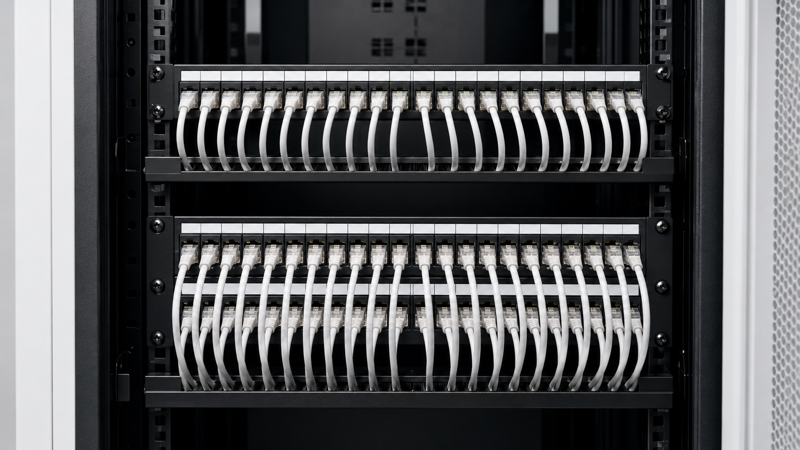
Best for simpler maintenance, smaller cabinets and clearer port-level organization.
Excellent for density, but cable routing and labeling must be more disciplined.
Choosing only by price or U count may create future cable-management problems.
■ When to Choose a 24-Port Patch Panel
A 24-port patch panel is usually the better choice when the installation is small to medium in size, or when easy maintenance is more important than maximum density. It is also a good option when the cabinet has enough vertical space and the installer wants more room for cable routing and identification.
Small to Medium Networks
A practical choice for offices, classrooms, retail sites and branch locations.
Easier Maintenance
Lower density makes port tracing, labeling and patch cord routing more comfortable.
More Flexible Expansion by Section
You can add another 24-port panel later without fully redesigning the rack layout.
■ When to Choose a 48-Port Patch Panel
A 48-port patch panel is designed for higher-density structured cabling systems. It is especially useful in MDF rooms, data center cabinets or enterprise distribution frames where maximizing rack capacity matters.
A 48-port panel saves rack space, but it concentrates more copper links into the same area. That means better horizontal cable managers, better labeling discipline and better patch cord routing are essential.
Best fit: high-density cabinets, large office floors, enterprise telecom rooms, consolidated wiring areas and installations where available rack units are limited.
■ Rack Space and Cable Management
One of the biggest differences between 24-port and 48-port patch panels is not electrical performance but operational layout. In most projects, the real question is whether you want to save rack space or reduce cable congestion.
| Layout Factor | 24-Port | 48-Port | What It Means |
|---|---|---|---|
| Vertical Space | Needs more U for same total ports | Saves U space | 48-port is better when cabinets are crowded. |
| Patch Cord Congestion | Lower | Higher | 24-port is easier to keep tidy. |
| Port Visibility | Better | Reduced in dense racks | 24-port helps daily maintenance. |
| Cable Manager Dependence | Moderate | High | 48-port should usually be paired with better cable managers. |
■ Cost and Expansion Logic
Buyers often assume 48-port means automatic savings because it uses fewer rack units. In reality, the cost logic depends on the full system: patch panels, cable managers, patch cords, cabinet size, labor and future changes.
| Cost Factor | 24-Port Logic | 48-Port Logic | Buyer Note |
|---|---|---|---|
| Initial Panel Cost | Usually lower per unit | Usually higher per unit | Compare total port requirement, not single unit price. |
| Rack Unit Cost | Higher total U use | More efficient use of U space | Important in expensive cabinet environments. |
| Maintenance Cost | Lower complexity | May require more organization effort | Dense panels need stricter labeling and routing. |
| Expansion Logic | Add in smaller blocks | Expand in larger port blocks | Choose based on growth predictability. |
■ Decision Rules / Engineer’s Shortcut
The best way to choose is to start with the cabinet and maintenance scenario, not with a product catalog alone.
| Project Requirement | Recommended Choice | Reason | Checkpoint |
|---|---|---|---|
| Small office or branch cabinet | 24-port | Easier management and usually enough capacity. | Check future growth margin. |
| High-density telecom room | 48-port | Better rack unit efficiency. | Use proper cable managers. |
| Frequent moves, adds and changes | 24-port | Simpler tracing and maintenance. | Keep port labeling clear. |
| Cabinet space is limited | 48-port | Saves rack space. | Plan patch cord routing early. |
| Uncertain expansion pattern | 24-port in modular stages | More flexible incremental growth. | Reserve extra U space if possible. |
If you expect fewer than 48 active copper links in one cabinet and maintenance simplicity matters, use 24-port. If you already know the cabinet will carry many copper links and every rack unit matters, use 48-port.
■ OEM Ordering Notes
When ordering patch panels for projects or OEM supply, buyers should confirm more than the port count. Category, shielding, IDC type, mounting size, labeling format and accessories can all affect installation.
Electrical Specification
Confirm Cat5e, Cat6, Cat6A or shielded version according to project requirement.
Mechanical Design
Confirm 24-port or 48-port layout, 19-inch mounting size, blank or loaded style and cable management accessories.
Project Packaging
Confirm labeling, barcode, OEM brand, cartons and installation instructions if needed.
The right patch panel port count is only one part of the decision. For project success, match port count with category, shielding, rack space and cable management design.
■ FAQ
Is 48-port always better than 24-port?
No. 48-port is better for density and rack-space efficiency, but 24-port is often better for simpler maintenance and lower congestion.
Which one is better for a small office?
A 24-port patch panel is usually the better fit for small offices, classrooms and branch cabinets.
Which one saves more rack space?
A 48-port patch panel saves more rack space when you need higher total port count in one cabinet.
Is cable management harder with 48-port?
Yes, in many cases. Higher density means more patch cords in the same area, so cable routing and labeling must be better planned.
Can I mix 24-port and 48-port panels in one rack?
Yes. Many projects use both, depending on cabinet role, growth stage and operational preference.
What else should I confirm before buying?
Confirm category, shielding, termination style, panel type, cable manager compatibility and future expansion plan.
Need Patch Panels for Your Project?
Whether you need 24-port or 48-port patch panels, ZION Communication can support project-based selection, OEM branding and structured cabling requirements for office networks, telecom rooms and data center installations.