HDMI Cables Explained: How to Choose 4K, 8K, Fiber & Extender Solutions
Author: Site Editor Publish Time: 08-04-2026 Origin: Site
HDMI Cables Explained: How to Choose 4K, 8K, Fiber & Extender Solutions
If you are choosing HDMI products for TVs, projectors, conference rooms, gaming displays, digital signage, or OEM supply, the key is not just “HDMI 2.0 vs HDMI 2.1.” You need to match bandwidth, resolution, connector type, run length, and installation method. This guide helps buyers quickly choose between standard HDMI cables, premium 4K cables, 8K cables, fiber HDMI, and HDMI extenders.
For most 4K commercial and retail demand, 18Gbps HDMI is the practical mainstream choice.
For 8K, 4K120, gaming, and higher-bandwidth systems, move to 48Gbps HDMI.
When distance or routing becomes the problem, choose fiber HDMI or HDMI extenders instead of forcing a long passive copper run.
■ Direct Answer: Which HDMI Product Should You Choose?
If your project is built around mainstream 4K displays, conference systems, IPTV, projectors, or commercial AV screens, start with an 18Gbps HDMI solution. If your project targets 8K video, 4K at 120Hz, advanced gaming, or premium high-refresh displays, move to a 48Gbps HDMI solution. If the problem is distance rather than format, choose fiber optic HDMI or an HDMI extender over Cat cable.
For most buyers, the best selection logic is simple: match the cable to the actual resolution, bandwidth, connector type, and installation path instead of choosing only by version number.
■ HDMI Cable Classes That Matter
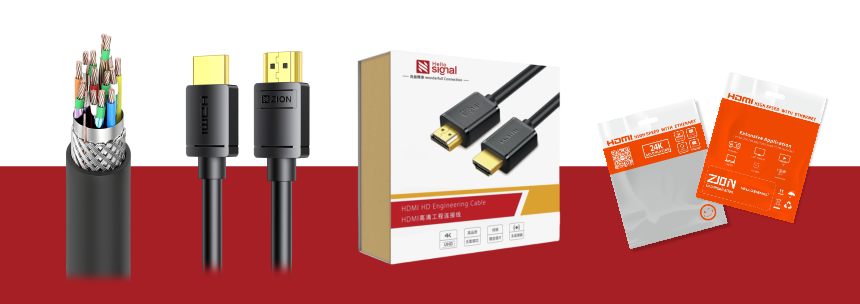
| Cable / Solution Type | Typical Bandwidth Class | Best For | Practical Note |
|---|---|---|---|
| High Speed HDMI | Up to 10.2Gbps | 1080p and some 4K30 needs | Useful as an entry-level baseline |
| Premium High Speed HDMI | 18Gbps | 4K60, HDR, advanced 4K systems | A practical choice for serious 4K product positioning |
| Ultra High Speed HDMI | 48Gbps | 8K60, 4K120, higher-end gaming and premium AV | Best fit for higher-bandwidth display demand |
| Fiber Optic HDMI | Depends on design and model | Longer runs and cleaner routing | A better answer to distance limits than overselling passive copper |
| HDMI Extender | Depends on chipset and transmission method | Conference rooms, signage, AV distribution over Cat cable | Choose this when structured cabling already exists in the building |

■ HDMI 2.0 vs HDMI 2.1: What Buyers Usually Mean
| Market Search Term | What Buyers Usually Mean | Clearer Product Language | Why It Helps |
|---|---|---|---|
| HDMI 2.0 cable | 4K60, HDR, general 4K TV or projector connection | 18Gbps HDMI cable / 4K60 HDMI cable | It matches the buyer’s actual display requirement |
| HDMI 2.1 cable | 8K, 4K120, gaming, high-refresh display | 48Gbps HDMI cable / 8K HDMI cable / 4K120 HDMI cable | Clearer for both searchers and purchase approvals |
| Long HDMI cable | Need distance without signal loss | Fiber HDMI cable / HDMI extender | Helps buyers choose the right transmission method |
| Mini HDMI / Micro HDMI | Need the right device-side connector | Type C / Type D HDMI connector | Improves compatibility matching and reduces return risk |
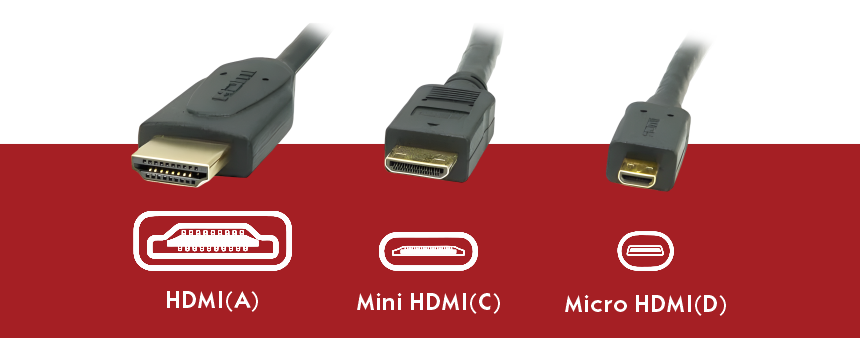
■ HDMI Connector Types: Standard, Mini, and Micro
| Connector Type | Typical Device | Use Case | Selection Tip |
|---|---|---|---|
| Type A (Standard HDMI) | TVs, monitors, projectors, game consoles, PCs | Mainstream full-size HDMI connection | This is the default format for most commercial HDMI products |
| Type C (Mini HDMI) | Cameras, portable devices, some tablets | Compact output to monitor or recorder | Commonly needed in media production accessories |
| Type D (Micro HDMI) | Smaller portable electronics | Space-limited HDMI output | Useful when the device uses a smaller HDMI interface |
■ How to Choose the Right HDMI Product by Application
| Application | Recommended Solution | Why It Fits | What to Confirm |
|---|---|---|---|
| 4K TV / general home entertainment | 18Gbps HDMI cable | Meets mainstream 4K needs with better cost control | 4K60, HDR, device-side Type A ports |
| Gaming monitor / premium display | 48Gbps HDMI cable | Supports higher-bandwidth and high-refresh scenarios | 4K120, 8K, system compatibility, cable grade |
| Conference room table to display | 18Gbps HDMI or HDMI extender | Depends on distance and room wiring | Cable path, wall boxes, Cat cabling availability |
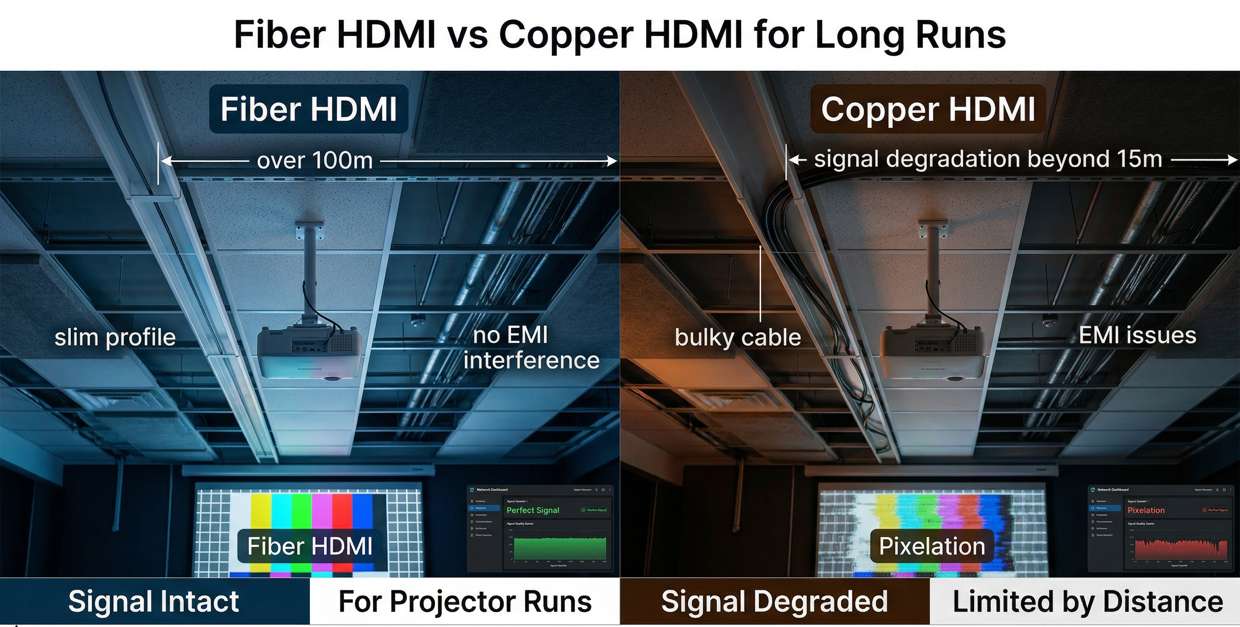
| Projector installation | Fiber HDMI cable | Better for longer and cleaner hidden runs | Directionality, bend handling, supported format |
| Digital signage / retail display | HDMI extender over Cat cable | Works well where displays are far from the source | Transmission distance, power, endpoint layout |
| OEM / retail channel sales | 18Gbps + 48Gbps mixed range | Covers mainstream and premium price tiers | Packaging, barcode, branding, model naming consistency |
Projector or display is far from the source device
You need a cleaner hidden cable route
Passive copper becomes impractical for the run
You want a lighter long-distance HDMI solution
The site already has Cat5e / Cat6 cabling
You are doing conference, signage, or AV distribution
The source and display are installed in different areas
You need a more infrastructure-friendly installation method
■ HDMI Buying Checklist
| Check Item | Why It Matters | Typical Inquiry Language |
|---|---|---|
| Required video format | Determines 18Gbps vs 48Gbps direction | Need 4K60 HDR or 4K120 / 8K support |
| Cable length | Affects whether copper, fiber, or extender is better | Need 2m / 5m / 10m / 20m or long-distance solution |
| Connector type | Prevents mismatch and returns | Type A to Type A, Mini HDMI, Micro HDMI |
| Installation method | Determines if in-wall, projector, or rack setup needs a different solution | Conference table, ceiling projector, wall display, rack-to-screen |
| Market positioning | Drives packaging and product grade | Retail pack, braided type, premium 8K series, OEM branding |
| Product trust signals | Improves buyer confidence and listing quality | Need verified 18Gbps or 48Gbps product positioning |
4K60 project = start from 18Gbps HDMI
8K or 4K120 project = start from 48Gbps HDMI
Long route = evaluate fiber HDMI
Existing Cat infrastructure = evaluate HDMI extender
Portable device = confirm Mini or Micro HDMI connector type
■ FAQ

Send us your target resolution, cable length, connector type, and installation scenario. ZION can help match the right HDMI cable, fiber HDMI, or HDMI extender solution for your application.


