Fiber Optic Installation Process 2026 Guide | ZION Communication FTTH & Data Center Cabling
Author: James Publish Time: 16-01-2026 Origin: Site
Fiber Optic Installation Process: Complete 2026 Guide
A practical, engineer-friendly guide to planning, installing, testing, and maintaining modern fiber optic networks for FTTH, FTTR, smart buildings, and data centers in 2026.
Use OS2 G.657.A2 fiber and micro-duct blowing for future-proof FTTH / FTTR and campus builds.
Plan around standards: TIA-568, ISO/IEC 11801, IEC 61300-3-35 and ITU-T PON optical budgets.
Reduce risk with pre-terminated MPO/MTP trunks, proper cleaning, and certified OTDR + OLTS testing.
■1) Why Fiber Dominates in 2026
In 2026, fiber optic cabling has become the default choice for new network backbones, FTTH deployments, Wi-Fi 7 edge infrastructure and AI-ready data centers. It delivers higher bandwidth, longer distance, stronger noise immunity and better long-term ROI than copper.
| Feature | Cat6A Copper | OS2 Single-Mode Fiber |
|---|---|---|
| Typical distance | Up to 100 m | 40–80 km+ (PON / DWDM) |
| Bandwidth roadmap | Up to 10G | 100G–800G and beyond |
| EMI immunity | Susceptible | Fully immune |
| Lifespan in building | ~5–10 years | 20+ years, often outlives active gear |
| Ideal use | Short patch runs | Backbone, FTTH, FTTR, data center fabrics |
For new commercial and residential builds in 2026, fiber optic cabling should be considered the primary backbone medium, with copper reserved mainly for short patching and legacy extensions.

■2) Planning the Fiber Infrastructure
Effective fiber optic installation starts with network planning. This is where engineers define performance targets, topology and long-term upgrade paths.
Core planning questions
Indoor vs outdoor routing: which segments run in ducts, risers, or trays?
Backbone vs horizontal: what stays fiber, what remains copper?
FTTH vs FTTR: fiber-to-home only, or fiber-to-each-room in MDUs?
PON roadmap: GPON today, XGS-PON or 25G PON tomorrow?
Fiber type: OS2 for backbones vs OM4 for short high-speed links.
Most modern buildings standardize on OS2 G.657.A2 single-mode for all vertical and horizontal backbone links, even if access switches initially run at 1G/10G. Transceiver upgrades can later unlock 25G/50G/100G without touching the fiber plant.
■3) Selecting the Right Fiber Optic Cable
Cable construction must match the environment: outdoor duct, direct burial, aerial span, indoor riser or FTTH last drop. Wrong construction increases failure risk and installation cost.
| Use Case | Recommended Cable Type | Typical Fiber | Notes |
|---|---|---|---|
| Outdoor duct / direct burial | Loose-tube armored | OS2 G.657.A2 | Gel-filled or dry core; rodent and crush resistant. |
| Aerial span | ADSS / figure-8 | OS2 | Designed for wind, ice load and pole distances. |
| Indoor riser / backbone | Tight-buffer LSZH | OS2 or OM4 | Meets fire rating and bend-radius requirements. |
| FTTH last mile | Flat / round drop cable | OS2 G.657.A2 | Optimized for tight bends along walls and corners. |
| MDU / FTTR | Mini-breakout 2–12 core | OS2 G.657.A2 | Fiber-to-the-room with compact indoor routing. |
| Data center | MPO/MTP trunk | OS2 or OM4/OM5 | High density, pre-terminated, fast installation. |
ZION Communication supplies OS2, OM3/OM4/OM5, FTTH drops, mini-breakout cables, and MPO-ready trunks that match these scenarios, helping integrators standardize BOMs globally.
■4) Tools, Test Equipment & 2026 Standards
Professional fiber optic installation requires a complete toolkit. Cutting corners here usually shows up as intermittent faults and high loss after go-live.
Essential fiber installation tools
Precision fiber cleaver and fusion splicer
Strippers, jacket removal tools and cable shears
Mechanical splice kit (for temporary or emergency use)
Connector kits: SC/APC, LC, MPO/MTP, field-polish types
Cable management: trays, ties, labeling and tags
Test instruments: OTDR, OLTS/power meter and
Key standards in 2026
TIA-568.3-D – Optical fiber cabling and components standard.
ISO/IEC 11801-1 – Generic cabling for customer premises.
IEC 61300-3-35 – Endface inspection and cleanliness criteria.
ISO/IEC 14763-3 – Fiber optic cabling testing methods.
ITU-T PON standards – GPON, XGS-PON, and 25G PON optical budgets.
In 2026, endface inspection with an IEC 61300-3-35-compliant scope is no longer “nice-to-have”. Many operators reject links that show visible contamination, regardless of loss figures.

■5) Bend Radius, Pulling Tension & Handling
Fiber offers incredible signal performance but is physically sensitive to bending, tension and crush forces. Installers must respect manufacturer limits to avoid hidden attenuation.
Core handling rules
Never exceed the specified minimum bend radius (install and operational).
Use pulling lubricant for long duct runs or tight conduit paths.
Measure or monitor pulling tension; do not guess.
Avoid stepping on cable reels or stacking heavy objects on fiber drums.
Modern G.657.A2 fibers such as ZION’s FTTH and mini-breakout cables tolerate tight bends (7.5–10 mm radius), but installers should still avoid sharp corners, cable kinks and forced 90° turns behind wall plates.
■6) Site Preparation & Installation Methods
Site preparation ensures that ducts, risers and paths are ready before fiber is pulled or blown. Poor preparation leads to blocked conduits, high friction and cable damage.
Typical preparation tasks
Excavating and laying HDPE ducts for outdoor networks.
Cleaning and rodding existing conduits in brownfield projects.
Identifying riser shafts and cable tray routes inside buildings.
Setting up aerial spans and pole hardware for ADSS cables.
Planning micro-duct bundles for campus and FTTH rollouts.
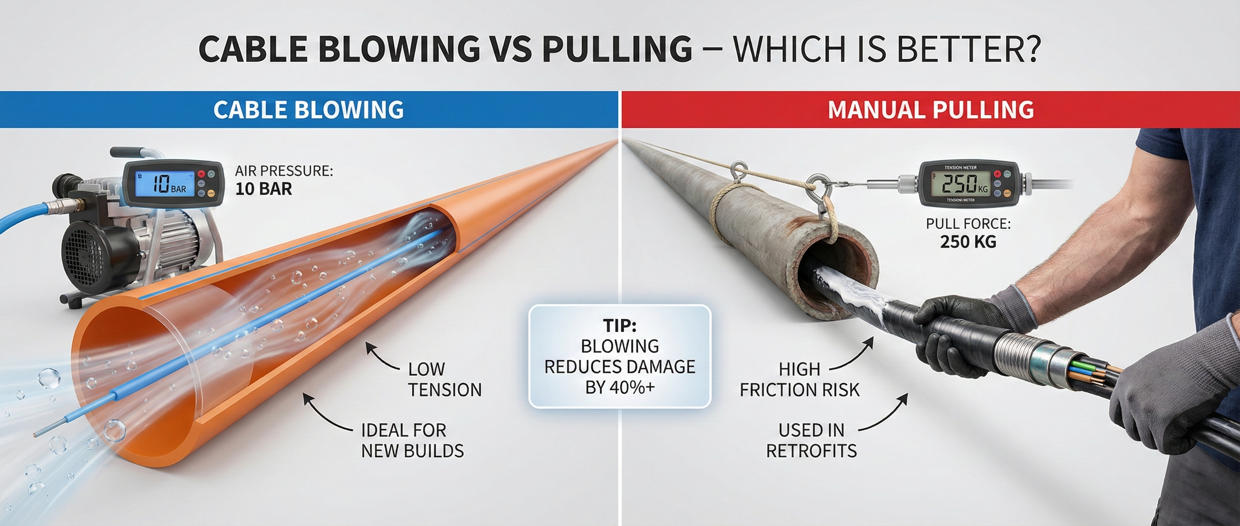
Cable blowing vs. pulling
Modern deployments favor cable blowing for long runs, while pulling is used in short, complex existing pathways.
| Method | Best for | Advantages | Risks / Limitations |
|---|---|---|---|
| Cable blowing | New ducts, campus, FTTH, long straight runs | Fast, low mechanical stress, long distances achievable. | Requires blower equipment and suitable duct design. |
| Cable pulling | Existing conduits, short or complex paths | Works with legacy pathways and limited space. | Higher tension risk, more friction, requires careful lubrication. |
■7) Termination & Splicing Options
The termination strategy affects link loss, reliability and installation time. In 2026, fusion splicing and pre-terminated assemblies dominate critical links.
Common termination methods
Fusion splicing – lowest loss and reflection; preferred for OSP, FTTH and backbone.
Mechanical splicing – fast and tool-light; backup for repairs and temporary fixes.
Field-installable connectors – useful at ONT, outlet or small distribution points.
Factory pre-terminated cables – used heavily in data centers and critical enterprise runs.
Data centers and FTTR upgrades increasingly use pre-terminated MPO/MTP trunks from ZION. This dramatically reduces onsite termination errors, speeds up deployment and allows more predictable loss budgets.
■8) Testing, Commissioning & Certification
Every fiber optic link must be measured and documented. Skipping proper testing leads to disputes, callbacks and poor user experience.
Essential fiber tests
Insertion Loss (IL) – verifies overall attenuation for each link.
Return Loss (RL) – detects reflection problems at connectors or splices.
OTDR trace – locates splices, connectors, bends and breaks along the span.
Polarity & continuity – essential for MPO/MTP systems and duplex links.
PON optical budget – ensures GPON/XGS-PON/25G PON remain within power limits.
For professional projects, testing must follow TIA-568, ISO/IEC 14763-3 and operator-specific acceptance criteria, with clear documentation for each fiber pair or PON leg.
■9) Decision Rules / Engineer’s Shortcut
The table below gives fast selection rules for fiber type, cable construction and termination style, based on distance and environment.
| Scenario | Recommended Fiber | Cable Type | Termination Choice | Reason |
|---|---|---|---|---|
| < 100 m in server room | OM4 multimode | Indoor tight-buffer or MPO trunk | Pre-terminated MPO/MTP | High density, easy adds/moves. |
| Building backbone 100–600 m | OS2 G.657.A2 | Indoor LSZH backbone | Fusion splicing to pigtails | Low loss, future speed upgrades. |
| FTTH last mile drop | OS2 G.657.A2 | Flat/round drop cable | Pre-terminated or fusion | Tight bend tolerance in homes. |
| Campus / industrial outdoor | OS2 | Loose-tube armored / ADSS | Fusion splicing | Long distance, harsh conditions. |
| FTTR in MDU / hotel | OS2 G.657.A2 | Mini-breakout 2–12 core | Pre-terminated or field connectors | Multi-room coverage, fast rollout. |

■10) Securing & Maintaining Fiber Networks
Fiber networks require relatively little maintenance compared to active electronics, but basic hygiene and monitoring are essential to ensure long-term performance.
Inspect patch panels and ODFs for excessive bends or tension.
Clean and inspect connectors before each reconnection.
Keep dust caps on unused ports and pigtails.
Log OTDR/OLTS baselines and compare during annual reviews.
Monitor PON split ratios and ensure new subscribers remain within budget.
■11) Application Scenarios & FAQs
ZION Communication fiber solutions are deployed across multiple verticals, from residential FTTH to AI-ready data centers.
Typical application scenarios
FTTH / FTTR networks for ISPs and open access operators.
Smart buildings and Wi-Fi 7 infrastructure in offices and campuses.
Hospitals, universities and industrial plants requiring reliable backbones.
Edge and core data centers with MPO/MTP-based spine-leaf fabrics.
Industrial automation, CCTV backbones and SCADA links.
Frequently asked questions
Can I install fiber myself?
It is not recommended for professional projects. Incorrect handling, dirty connectors and poor splicing can cause high loss, intermittent failures and difficult-to-diagnose outages.
How long does fiber installation take?
Small FTTH or FTTR jobs may be completed in one day, while multi-building campuses and PON expansions can take weeks depending on civil works and testing scope.
Does fiber need maintenance?
Fiber cables themselves require minimal maintenance. Most issues arise from dirty or damaged connectors, improper patching, or accidental bends. Regular inspection and cleaning are usually sufficient.
■12) Conclusion & Final CTA
Fiber optic cabling is now the foundation for modern connectivity. With proper planning, correct cable selection, professional installation and standards-based testing, a single fiber plant can support multiple generations of active equipment and new services without re-cabling.
By combining OS2 G.657.A2 fibers, FTTH/FTTR drops, MPO/MTP trunks and high-quality passive components, ZION Communication helps engineers, ISPs and integrators build networks that are ready for Wi-Fi 7, XGS-PON and future 25G PON upgrades.
Share your project details, required distances, environments and target bandwidth. Our team can help you choose the right OS2/OM4 cables, FTTH drops, MPO trunks and passive components, and prepare a complete bill of materials.