How to Read an Ethernet Cable Datasheet: AWG, OD, Shielding and Jacket Guide
Author: Site Editor Publish Time: 15-05-2026 Origin: Site
How to Read an Ethernet Cable Datasheet: AWG, OD, Shielding, Jacket and Standards
A practical guide for project buyers, engineers and OEM customers to understand Ethernet cable datasheets, compare technical parameters, and avoid ordering cables that look similar but perform differently.
Quick Answer
An Ethernet cable datasheet tells you much more than the cable category. To judge whether a LAN cable is suitable for a project, buyers should read conductor size, conductor material, cable OD, shielding structure, jacket material, flame rating, transmission standard, PoE suitability and packaging information together.

Why Ethernet Cable Datasheets Matter
Many Ethernet cables look similar from the outside. A blue cable jacket, RJ45 connector or Cat6A label does not automatically confirm whether the product is suitable for PoE++, data center patching, horizontal cabling, industrial control cabinets or outdoor installation.
For B2B projects, the datasheet is a technical contract between the buyer, supplier and installer. It helps confirm performance claims, material selection, installation limits and compliance requirements before mass production or project delivery.
For buyers
- Compare products from different suppliers using the same technical language.
- Confirm whether the cable matches project drawings and tender requirements.
- Avoid confusing patch cord specifications with bulk cable specifications.
For engineers
- Check link length, PoE load, bend radius, OD and pathway capacity.
- Confirm shielding and grounding compatibility across the full channel.
- Reduce installation failures caused by wrong cable type or jacket rating.
AWG and Conductor: The First Parameter Buyers Should Check
AWG describes conductor size. A lower AWG number means a thicker conductor. For Ethernet cable procurement, AWG affects electrical resistance, PoE temperature rise, voltage drop, flexibility and cable OD.
| Parameter | Typical Options | What It Affects | Buyer Reminder |
|---|---|---|---|
| Conductor Size | 23AWG / 24AWG / 26AWG / 28AWG | Resistance, PoE heat, cable flexibility and OD | For permanent links and PoE, 23AWG or 24AWG solid copper is often safer. |
| Conductor Material | BC / CCA / CCS | Conductivity, durability and PoE suitability | For professional Ethernet projects, solid bare copper is strongly preferred. |
| Conductor Type | Solid / Stranded | Installation use and flexibility | Solid is for fixed cabling; stranded is for flexible patch cords. |
OD: Cable Diameter and Installation Fit
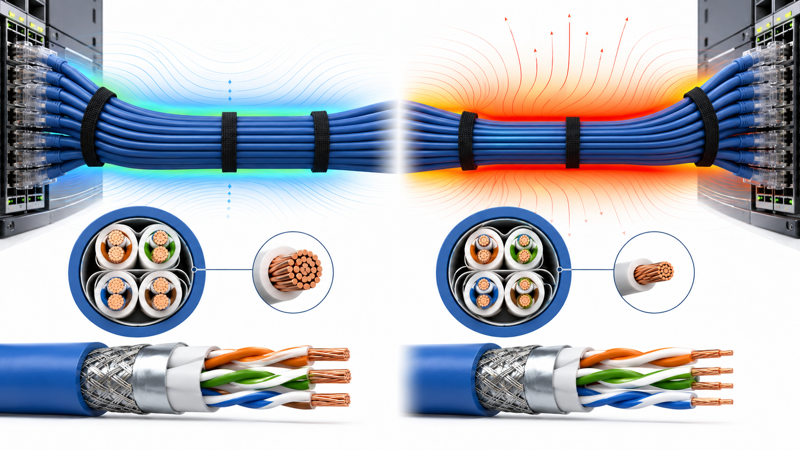
OD means outside diameter. It is easy to ignore, but it directly affects conduit fill, cable tray capacity, patch panel routing, bend radius and cable manager selection.
When larger OD is acceptable
- Horizontal cabling with enough tray or conduit space.
- Cat6A shielded cable requiring better alien crosstalk control.
- PoE-heavy installations where conductor size and heat margin matter.
When smaller OD helps
- High-density rack patching with short patch cords.
- Limited cable managers or dense cabinet routing.
- Applications where flexibility is more important than long-run PoE margin.
Shielding: UTP, FTP, F/UTP, U/FTP and S/FTP
Shielding information tells buyers how the cable protects twisted pairs from electromagnetic interference and alien crosstalk. It also affects connector selection, grounding method, cable flexibility and cost.
| Datasheet Marking | Meaning | Typical Use | Buyer Checkpoint |
|---|---|---|---|
| UTP | Unshielded twisted pair | Standard office and low-EMI projects | Simple installation; no shield grounding required. |
| F/UTP | Overall foil shield around all pairs | Commercial Cat6A and moderate EMI environments | Use shielded connectors and patch panels. |
| U/FTP | Individual foil around each pair | Higher performance and pair-to-pair isolation | Termination quality is important. |
| S/FTP | Overall braid plus individual foil | Industrial, high EMI and demanding projects | Confirm grounding path and connector compatibility. |
If the datasheet only says “STP”, ask the supplier to confirm the exact construction. STP is often used as a general buyer term, but it does not always describe the real shielding structure clearly.
Jacket Material: PVC, LSZH, PE and PUR
The jacket is not only the outer color. It defines where the cable can be installed and what environmental risks it can handle. Buyers should match jacket material with building safety, outdoor exposure, industrial movement or customer market requirements.
| Jacket Type | Typical Application | What to Confirm |
|---|---|---|
| PVC | General indoor network cabling | Flame rating, color, flexibility and market requirement. |
| LSZH | Public buildings, tunnels, transport and low-smoke projects | Low-smoke halogen-free requirement and CPR class if needed. |
| PE | Outdoor LAN cable and UV exposure | UV resistance, water blocking, double jacket and temperature range. |
| PUR | Industrial automation and drag-chain environments | Oil resistance, abrasion resistance, flexibility and bending cycles. |

Standards and Ratings: Do Not Read Them as Decoration
Standards and compliance markings on a datasheet should be connected to real product performance, test reports or certification scope. They should not be treated as marketing words.
Common performance references
- ANSI/TIA-568.2-D
- ISO/IEC 11801
- IEC 61156 series
- Category and bandwidth information such as Cat6A 500MHz
Common safety / market references
- CPR class for EU building projects
- UL or ETL listing when required by customer market
- RoHS / REACH for material compliance
- CM / CMR / CMP depending on building installation area
Ethernet Cable Datasheet Buyer Checklist
Use the following checklist before approving samples or confirming mass production.
- Confirm category: Cat5e, Cat6, Cat6A, Cat7 or Cat8 based on project bandwidth and channel design.
- Check conductor material: prefer solid bare copper for professional permanent links and PoE applications.
- Check AWG: 23AWG / 24AWG for robust permanent cabling; thinner gauges mainly for short patching.
- Check conductor type: solid for fixed installation, stranded for patch cords.
- Check OD: make sure the cable fits conduits, cable trays, patch panels and cable managers.
- Check shielding: UTP, F/UTP, U/FTP or S/FTP should match EMI risk and grounding plan.
- Check jacket: PVC, LSZH, PE or PUR should match indoor, public building, outdoor or industrial use.
- Check standards: verify performance, flame rating and compliance documents before using them in project submission.
- Check printing: confirm cable marking includes category, AWG, shielding, jacket, length and OEM information.
- Check packaging: box, reel, drum or carton should match installation method and shipping requirements.
Risk Indicators for Datasheet Review
| Risk Level | Datasheet Condition | Buyer Action |
|---|---|---|
| PASS | Category, AWG, conductor material, OD, shielding, jacket, standards and printing are clearly listed. | Proceed to sample testing and quotation confirmation. |
| WARNING | The datasheet lists category but lacks AWG, conductor material, OD or jacket rating. | Ask supplier to provide complete technical data before ordering. |
| FAIL | Claims Cat6A, PoE or certification without test data, material details or standard reference. | Do not approve for project use until technical evidence is provided. |
Typical Datasheet Line Example
A complete cable description should make the product easy to identify without guessing.
CAT6A F/UTP 4PR 23AWG SOLID BC LSZH 500MHz ISO/IEC 11801 ANSI/TIA-568.2-D RoHS 305M Pull Box This line tells the buyer the category, shielding structure, pair count, conductor size, conductor type, conductor material, jacket, bandwidth reference, standards and packaging length.
FAQ
Cat6A provides better 10G and alien crosstalk margin, but it may have larger OD and higher cost. The right choice depends on link speed, installation space, PoE demand and future upgrade plan.
Not always. 23AWG is common for robust Cat6A permanent links and PoE-heavy projects. For short patch cords or lower-density racks, 24AWG, 26AWG or slim patch cords may be used depending on design limits.
Shielded cable should be treated as a system. Cable shield, connector, patch panel, rack and grounding path should be compatible. Otherwise the shielding benefit may be reduced.
The most common mistake is focusing only on cable category while ignoring conductor material, AWG, jacket rating, OD and installation environment.
Need Help Reviewing an Ethernet Cable Datasheet?
ZION Communication can support OEM and project buyers with Ethernet cable selection, sample confirmation, printing requirements and packaging options.