MPO Fiber Troubleshooting Guide
Author: James Publish Time: 31-03-2026 Origin: Site
MPO Fiber Troubleshooting Guide
A practical engineering reference for isolating MPO link failure, high insertion loss, polarity mismatch, and mapping errors before you replace components blindly.
Start with contamination, polarity, and patch-cord isolation before suspecting the trunk.
No link and high loss can look similar, but their most likely causes are not the same.
Replace only after inspection, retest, and known-good swap confirm the failed component.
■ 1) What This Guide Covers
MPO troubleshooting is not only about finding a dirty connector. In real deployments, no-link alarms, high insertion loss, intermittent channels, and lane-mapping errors can all appear after installation, migration, cleaning, or a simple patch change. The challenge is that multiple failure causes produce similar symptoms.
This page is designed as an engineering decision reference. It focuses on what to check first, how to separate physical contamination from polarity problems, how to verify whether the module or jumper is at fault, and when replacement is justified instead of repeated rework.
| Observed Symptom | Most Likely Causes | First Action | Escalation Path |
|---|---|---|---|
| No link | Polarity mismatch, severe contamination, wrong module type, wrong jumper gender | Inspect and clean both ends | Verify mapping and swap known-good patch cord |
| High loss | Dirty endface, worn ferrule, poor mating, damaged cassette, bend stress | Inspect loss contributors by segment | Retest channel and isolate failed section |
| Mapping error | Wrong polarity type, wrong cassette architecture, lane mismatch in parallel optics | Confirm full channel design | Reconfigure with correct trunk/module/jumper combination |
■ 2) Common Failure Modes
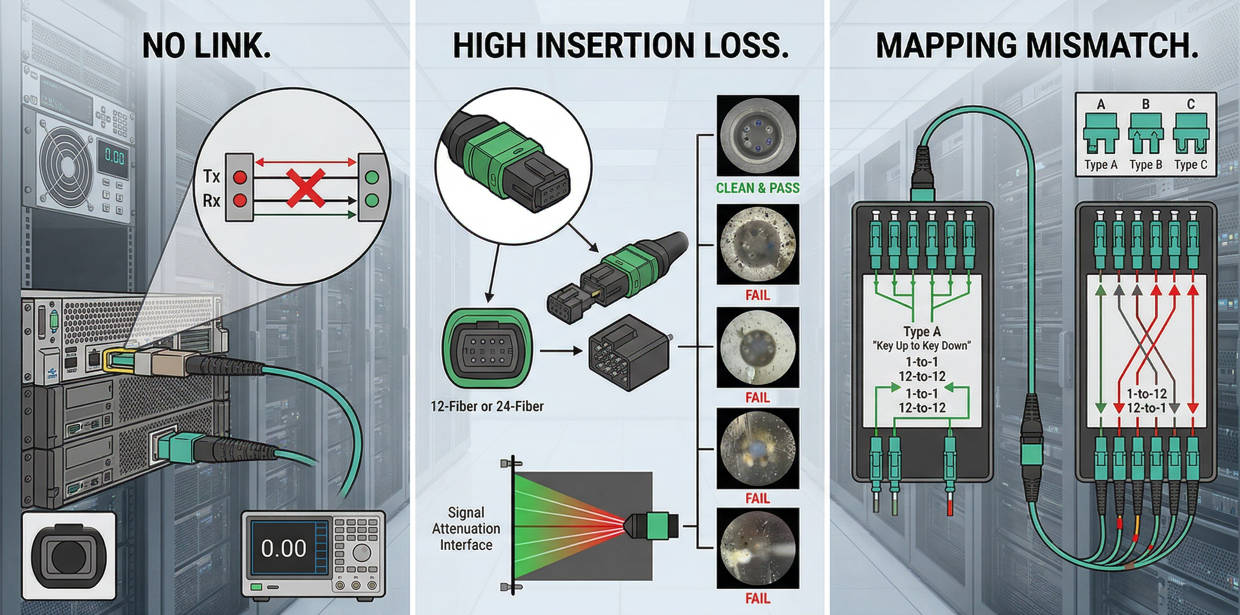
No link
A complete link-down event usually means the optical path is broken logically, physically, or both. In practice, the common reasons are wrong polarity, heavy contamination, incompatible interfaces, or a failed patch component introduced during a move or maintenance action.
High insertion loss
Loss-related faults may not take the channel fully offline at first. They often appear as unstable performance, failed certification, reduced margin, or inconsistent channel behavior under speed upgrades. This is where ferrule condition, mating quality, and module quality become critical.
Mapping or polarity mismatch
Parallel optics and cassette-based channels require strict transmit-to-receive alignment. A channel can look physically correct and still fail logically if trunk type, cassette design, and patch orientation do not match the target architecture.
| Failure Mode | Typical Trigger | Operational Risk | Cost Impact |
|---|---|---|---|
| No link after installation | Wrong polarity combination or incorrect cassette | Immediate service delay | High labor if channel must be reopened |
| Loss above budget | Dirty endface, poor ferrule, excessive interfaces | Reduced margin and upgrade risk | Retesting and replacement overhead |
| Intermittent channels | Mechanical wear, stress, poor insertion, contaminated remate | Difficult fault isolation | Repeat dispatch and downtime exposure |
■ 3) Cleaning and Endface Check
Contamination remains the most common and most underestimated cause of MPO failure. Because multiple fibers share one ferrule, a small particle can affect several lanes at once. This is why one dirty connector often creates grouped channel errors instead of a single-fiber problem.
Inspection should cover both ends of the mated pair, not only the connector that was recently handled. A clean-looking housing does not guarantee a clean endface. The decision rule is simple: inspect, clean, inspect again, and only then retest.

■ 4) Polarity and Mapping Check
If cleaning does not restore the link, the next checkpoint is polarity and lane mapping. In MPO channels, the signal path depends on the combined logic of trunk type, cassette orientation, jumper type, and application requirement. A single wrong assumption in this chain can keep the link down even when every connector is physically sound.
This is especially important in environments mixing legacy channels, new cassettes, and patch replacements from different maintenance cycles. Documentation errors often show up here before hardware defects do.
| Check Item | What to Confirm | Typical Error | Corrective Action |
|---|---|---|---|
| Trunk polarity | Type A, B, or C matches channel design | Wrong polarity assumption during expansion | Use correct matching module/jumper |
| Cassette or module | Internal mapping fits target application | Wrong cassette inserted into active path | Replace with correct polarity architecture |
| Patch cord orientation | Correct mating direction and gender | Male/female mismatch | Use compatible jumper assembly |
| Parallel optics lane logic | Transmit and receive lanes align | Channel present but mapped incorrectly | Revalidate lane plan and test mapping |
■ 5) Modules, Trunks, and Patch Cords
Once cleaning and polarity are checked, the next step is physical isolation by component. Patch cords are usually the fastest and cheapest component to swap, so they should be tested before you suspect the trunk. Cassettes and modules come next because they can introduce both loss and mapping errors. Trunks should generally be the last passive component to blame unless installation stress or known site damage exists.
Patch cords
Look for wear, bend stress, wrong gender, ferrule damage, or repeated remating. A known-good swap is often the fastest diagnostic move.
Modules and cassettes
These components are common hidden fault points because internal mapping and termination quality are not visible externally. If only one cassette position fails consistently, isolate it and compare against a known-good position.
Trunks
Trunks are usually stable, but crushing, bend-radius violations, and endpoint damage during installation or rework can create persistent loss or continuity issues. Because trunk replacement is disruptive, confirm every simpler cause first.
■ 6) Decision Rules / Engineer’s Shortcut
The goal is not only to find the fault but to avoid wasting labor on the wrong part of the channel. Use the table below as a fast decision tool when the field team needs a repeatable sequence.
| If You See This | Most Efficient Next Check | Do Not Do First | Likely Outcome |
|---|---|---|---|
| Link failed right after patching or maintenance | Inspect and clean all affected interfaces | Do not replace the trunk immediately | Contamination or remate issue is often found |
| New installation shows no link | Check polarity, cassette type, and jumper compatibility | Do not assume fiber breakage first | Logical channel mismatch is common |
| Loss is high on only one segment or path | Swap patch cord or isolate cassette | Do not rebuild the whole channel | Localized component fault is likely |
| Repeated cleaning does not restore performance | Inspect ferrule condition and try known-good swap | Do not continue endless remating | Ferrule or housing damage may be confirmed |
| Mapping passes physically but service still fails | Check lane assignment for target transceiver/application | Do not focus only on endface contamination | Application-level mapping problem may be found |
■ 7) Application Scenarios
Troubleshooting priorities vary by deployment. In a structured cabling environment, documentation and polarity logic usually dominate. In a live data center migration, contamination and patch handling may be the faster suspects. In procurement-controlled projects, compatibility across vendors can become the main risk.
| Scenario | Main Failure Driver | Priority Check | Recommended Action |
|---|---|---|---|
| New data center deployment | Polarity and architecture mismatch | Validate trunk/module/jumper design | Approve channel map before service turn-up |
| MAC activity or rack rework | Connector contamination and remating faults | Inspect and clean all touched interfaces | Use documented retest sequence |
| Multi-vendor procurement project | Compatibility assumptions | Check connector type, polarity logic, loss target | Request sample and validation report before rollout |
| Upgrade to higher-speed optical links | Margin loss from legacy channel design | Review full loss budget and interface count | Replace high-risk components before migration |
■ 8) Common Mistakes and Risks
The most expensive troubleshooting cycles usually come from wrong sequencing rather than rare hardware defects. Teams often replace the most expensive component first, skip endface inspection, or assume that physical connectivity means logical correctness. Each mistake adds labor, delays commissioning, and can create false confidence in an unstable channel.
Replacing trunks before isolating patch cords and cassettes
Cleaning without inspection, then assuming the channel is restored
Mixing polarity types without validating the full route
Using incompatible male/female connector combinations
Ignoring loss-budget impact during speed upgrades
Skipping documentation updates after maintenance changes
| Mistake | Why It Happens | Risk Level | Prevention Rule |
|---|---|---|---|
| Blind replacement | Pressure to restore service quickly | High | Use swap-based isolation sequence |
| Polarity assumptions | Mixed legacy and new components | High | Validate trunk + cassette + jumper as one system |
| No loss-budget review | Upgrade planning focuses only on speed | Medium to high | Check interface count and expected insertion loss |
| Poor change records | Maintenance work not documented | Medium | Update channel records after every MAC |
■ 9) FAQ
Can a dirty MPO connector really cause a full link-down event?
Yes. Because multiple fibers share one ferrule, contamination can affect several lanes at the same time. In practice, a dirty MPO interface can produce no link, unstable link, or grouped channel failure depending on the application and the severity of contamination.
When should we suspect polarity instead of cleaning?
If the channel fails immediately after a new installation or after component replacement, and cleaning does not change the result, polarity and mapping should be checked next. This is especially important for cassette-based structured cabling and parallel optics applications.
Which component should be replaced first during troubleshooting?
Normally none should be replaced first without isolation. The preferred sequence is known-good patch cord swap, then cassette or module isolation, and only then trunk investigation. This reduces cost and avoids unnecessary disruption.
Are MPO components from different suppliers always compatible?
Not automatically. Physical mating may be possible while loss performance, polarity logic, connector gender, or lane mapping expectations still differ. For multi-vendor projects, sample validation and channel-level testing are strongly recommended before volume deployment.
How do procurement teams reduce troubleshooting risk before rollout?
Request clear polarity documentation, expected insertion-loss targets, connector gender details, test records, and sample assemblies for validation. Early compatibility checks usually cost less than field rework after installation.
When is replacement justified instead of repeated cleaning and retesting?
Replacement is justified when inspection shows ferrule damage, guide-pin issues, housing damage, or when repeated cleaning and retest still fail while a known-good swap confirms that the component is the fault source.
■ 10) Conclusion
A stable MPO troubleshooting process is built on sequence, not guesswork. Start with inspection and cleaning, then verify polarity and mapping, then isolate the lowest-cost components first. This reduces downtime, protects the budget, and prevents unnecessary trunk replacement or channel redesign.
For engineering, procurement, and project teams, the practical rule is simple: treat the MPO channel as a system. Check contamination, compatibility, mapping, and loss budget together. That approach is more reliable than troubleshooting each component in isolation after the problem has already affected service.
Send your link architecture, polarity requirement, fiber count, connector type, application speed, and target loss budget. ZION can help review compatibility, sample requirements, and practical deployment risks before bulk rollout.