Wi-Fi 7 vs Wi-Fi 6 (2026): What’s Really Different — and Why Cabling Matters More Than Ever
Author: Will Publish Time: 23-01-2026 Origin: Site
Wi-Fi 7 vs Wi-Fi 6 (2026): What’s Really Different — and Why Cabling Matters More Than Ever
Wi-Fi 7 upgrades the air interface, but it also raises the bar for the wired side: multi-gig uplinks, PoE++ thermal limits, and tighter cabling loss budgets. This guide helps engineers and buyers choose the right structured cabling baseline for 2026 Wi-Fi projects.
Wi-Fi 7 is not “just faster Wi-Fi” — it drives 5G/10G uplinks and PoE++ in real deployments.
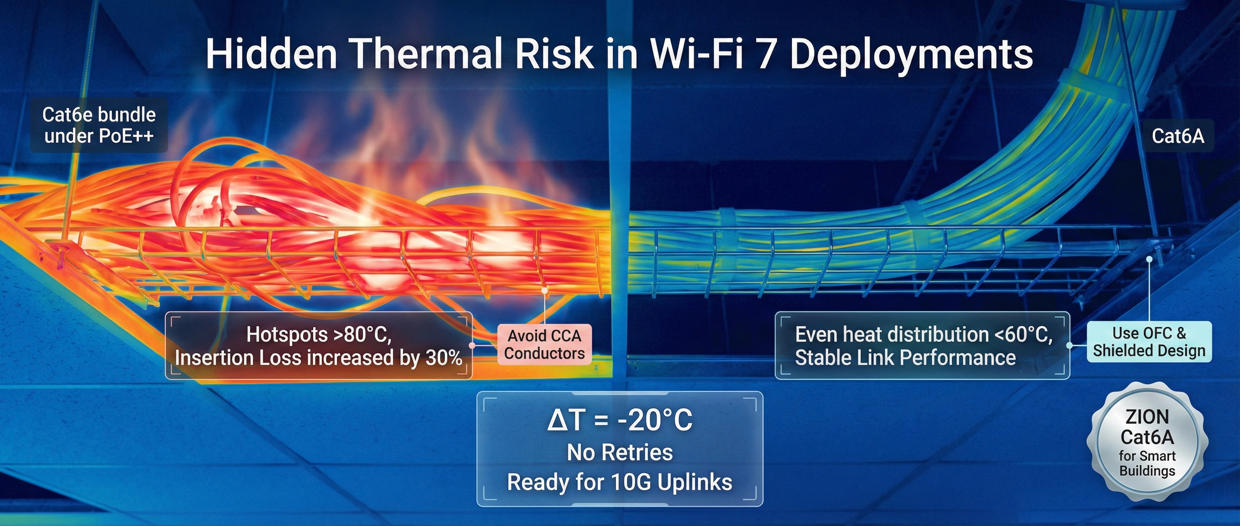
Thermal margin becomes a risk factor in bundled pathways: heat increases loss and error rates under sustained load.
Cat6A is the minimum baseline for new Wi-Fi 7 AP drops in 2026; fiber belongs in aggregation/backbone tiers.
■ 1) Why Wi-Fi 7 Changes Cabling Decisions
In 2026, Wi-Fi 7 is increasingly deployed in offices, schools, venues, and smart buildings where user density and latency sensitivity are high. The common misconception is to treat Wi-Fi as a purely wireless upgrade. In practice, the access point becomes a high-power, high-throughput edge device that depends on the wired uplink for deterministic performance.
Wi-Fi 7 is a “wired-side upgrade” in disguise
Wider channels, higher modulation density, and multi-link behavior increase throughput potential—but they also increase sustained traffic load on the uplink. Meanwhile, PoE++ makes heat and insertion loss a real engineering variable, especially in bundled pathways above ceilings and in cable trays.
■ 2) Wi-Fi 6 vs Wi-Fi 7: 2026 At-a-Glance Table
| Feature | Wi-Fi 6 (802.11ax) | Wi-Fi 7 (802.11be) | Why it matters to cabling |
|---|---|---|---|
| Max channel width | 160 MHz | 320 MHz | Higher peak throughput drives multi-gig uplinks and cleaner loss budgets. |
| Modulation | 1024-QAM | 4096-QAM | Denser modulation is more sensitive to real-world impairments; uplink stability becomes critical. |
| Multi-Link Operation | Single link per band | MLO (parallel links) | More consistent traffic load; uplink and switching must handle sustained multi-client throughput. |
| Typical AP uplink | 1G / 2.5G Ethernet | 5G / 10G Ethernet | Cat6A becomes the safe baseline; fiber fits aggregation/backbone tiers. |
| Power delivery | PoE / PoE+ | PoE++ (60–90 W) | Heat rise increases insertion loss; bundled pathways need thermal margin and proper cable selection. |

■ 3) What Wi-Fi 7 Improves (and What It Can’t)
What improves
Lower latency under congestion by coordinating more clients and better resource scheduling.
Higher peak throughput potential via wider channels and denser modulation (when conditions are ideal).
More consistent performance in dense spaces using features like MLO (implementation-dependent).
What it can’t change
Coverage physics: higher bands still trade range for capacity; 6 GHz penetration remains limited.
Interference realities: dense environments still require correct AP placement and channel planning.
Uplink dependency: a “fast AP” cannot outperform a constrained 1G uplink or overheated cabling pathway.
■ 4) PoE++ & Thermal Risk: The Hidden Bottleneck
Wi-Fi 7 access points are increasingly powered via PoE++. In real installations—ceiling voids, risers, cable trays—horizontal cables are often bundled. Under sustained PoE load, bundled copper can experience temperature rise that degrades performance and shortens service life.
Why Cat6A is more stable under PoE++
Compared with Cat6, Cat6A typically offers better thermal and electrical stability under sustained load due to its geometry and performance headroom. In bundled pathways, this extra margin helps reduce the risk of heat-related loss increase, packet errors, and accelerated aging.
| Risk trigger (2026) | What you may observe | Engineering response | Recommended baseline |
|---|---|---|---|
| PoE++ AP in dense zones | Heat rise, unstable peak rates | Control bundling, keep margin, validate channels | Cat6A for AP drops |
| Large cable bundles above ceiling | Insertion loss increases over time | Pathway planning, separation, labeling, airflow | Cat6A + best-practice routing |
| Uplink constrained at 1G | “Wi-Fi feels slow” despite new APs | Upgrade to 2.5G/5G/10G switching | Multi-gig ready cabling |
| High EMI / industrial pathways | Intermittent errors under load | Consider shielding & grounding plan | Shielded Cat6A (site dependent) |
■ 5) 2026 Deployment Scenarios & Cabling Baselines
Wi-Fi 7 value is highest where concurrency and latency matter: meeting rooms, classrooms, arenas, hospitality, and smart buildings with dense IoT. Use the table below to align deployment type with cabling baseline.
| Scenario | Typical Wi-Fi 7 driver | AP uplink tier | Power | Recommended cabling baseline |
|---|---|---|---|---|
| Enterprise offices | Meeting density, hybrid work | 2.5G–5G (some 10G) | PoE+/PoE++ | Cat6A to AP; fiber for IDF/MDF uplinks |
| Schools / campuses | High concurrency, classrooms | 5G–10G | PoE++ | Cat6A + pathway bundling control |
| Hospitality | Guest experience, streaming | 2.5G–5G | PoE+/PoE++ | Cat6A; consider shielded where EMI exists |
| Venues / public spaces | Ultra-dense users | 10G | PoE++ | Cat6A to AP; fiber aggregation/backbone |
| Smart buildings (IoT-heavy) | Always-on devices + control networks | 2.5G–5G | PoE+/PoE++ | Cat6A horizontal + structured labeling & maintenance plan |
■ 6) Decision Rules / Engineer’s Shortcut
Use the decision table below as a fast shortcut when selecting horizontal cabling for Wi-Fi 7 deployments. The goal is to preserve margin under multi-gig uplinks and PoE++ thermal load while keeping installation practical.
| If your project has… | Then prioritize… | Recommended baseline | Why |
|---|---|---|---|
| Wi-Fi 7 APs (new build / renovation) | 10G-ready horizontal cabling | Cat6A UTP (most sites) | Best balance of performance, installation ease, and lifecycle margin. |
| High bundling + PoE++ | Thermal margin & pathway discipline | Cat6A + bundling control | Reduces heat-related loss increase and intermittent faults. |
| Industrial EMI / noisy pathways | Noise control + grounding plan | Shielded Cat6A (site dependent) | Improves resilience where interference is unavoidable. |
| Long-term campus/backbone growth | Aggregation scalability | Fiber backbone | Lower loss, higher bandwidth headroom, better for tiered architectures. |
| Budget pressure but must be stable | Avoid rework risk | Cat6A baseline (do once) | Lowest lifecycle cost when counting labor and downtime. |
■ 7) TCO: Why “Cheaper Cable” Can Cost More
In real projects, cable material cost is only a fraction of total cost. Labor, pathway access, downtime, and troubleshooting often dominate the bill. Choosing a marginal cable category can create hidden costs later—especially when PoE load and multi-gig uplinks increase over time.
| Cost element | What drives it | How better cabling reduces TCO |
|---|---|---|
| Installation labor | Pulling, terminations, access constraints | Do it once: choosing the right baseline avoids expensive re-pulls. |
| Troubleshooting | Intermittent faults, heat-related degradation | More margin reduces “ghost issues” caused by load + bundling + loss. |
| Upgrade downtime | AP refresh cycles, switch uplink upgrades | Multi-gig ready structured cabling keeps upgrades at the electronics layer. |

■ 8) Conclusion + Next Steps
Wi-Fi 7 is a major step forward for dense, latency-sensitive environments—but it also raises the bar for what sits behind the access point. In 2026, the most reliable Wi-Fi 7 outcomes come from aligning three elements: AP density, multi-gig uplink tiers, and PoE++ thermal margin.
For new builds and renovations, ZION COMMUNICATION recommends using Cat6A structured cabling as the baseline for Wi-Fi 7 AP drops, and deploying fiber for aggregation and backbone tiers where bandwidth and distance scale.