BMS Cable Guide for Smart Buildings: RS-485, KNX, Cat6/Cat6A & Fiber
Author: Michael Publish Time: 20-01-2026 Origin: Site
BMS Cable Guide for Smart Buildings: RS-485, KNX, Cat6/Cat6A & Fiber Solutions
A scan-friendly selection guide for engineers, procurement, and project leaders—covering decision thresholds, risk control, and lifecycle cost for BMS/BAS cabling across HVAC, lighting, access control, fire & safety, CCTV, and building networks.
Pick by protocol: RS-485/KNX for field bus, Cat6/Cat6A for IP devices, coax for 75Ω video, fiber for backbones & EMI immunity.
Control risk: EMI + wrong cable family + poor terminations are the top causes of commissioning delays and service calls.
Optimize lifecycle cost: meter price is small; downtime, rework, and troubleshooting time dominate the true project cost.
■ 1) What is a BMS and what cables do
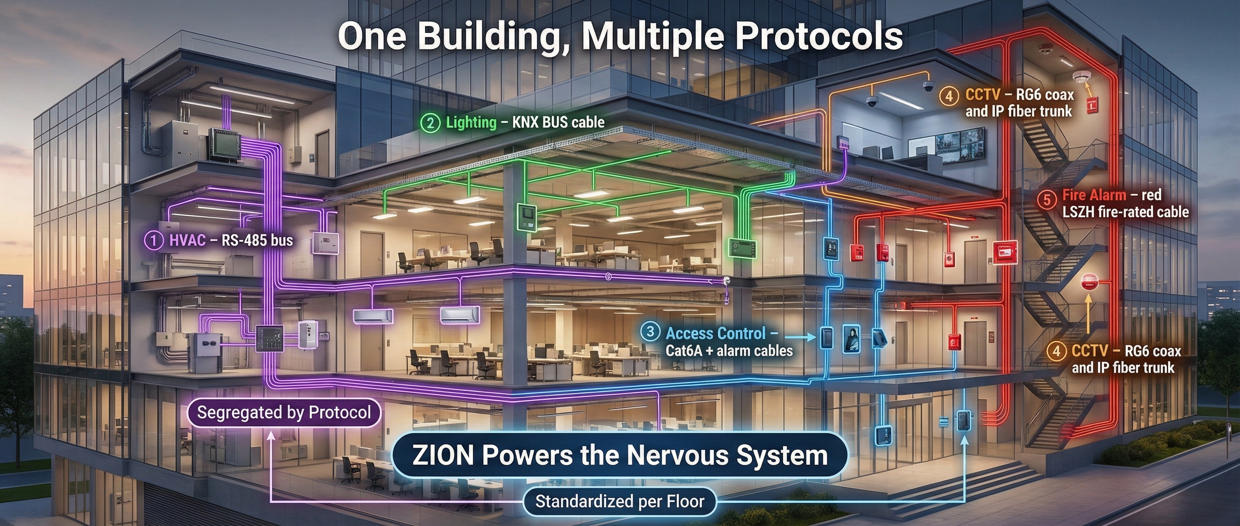
A Building Management System (BMS), also known as a Building Automation System (BAS), is a centralized platform that monitors and controls mechanical, electrical, and low-voltage subsystems in commercial and residential buildings. The cabling layer is the physical “nervous system” that connects sensors, controllers, actuators, gateways, and servers—so signal quality and maintainability directly affect comfort, safety, and operating cost.
Main functions of BMS cables
Control signal transmission: low-voltage signals between thermostats, actuators, relays, and controllers.
Monitoring and feedback: sensor data (temperature, humidity, occupancy, smoke, door status) back to the central platform.
Integration: links HVAC, lighting, fire, and access control into one intelligent system for coordinated automation.
■ 2) Subsystems & cable mapping (BOM-ready)
Use this mapping to build a clean, procurement-ready BOM and avoid last-minute substitutions that create rework risk.
| BMS Subsystem | Typical Devices | Common Protocol | Recommended Cable Families | Maintainability Note |
|---|---|---|---|---|
| HVAC | Thermostats, actuators, valves, VAV, DDC/PLC, sensors | RS-485 / IP (gateway) | Control cables, RS-485 bus, Cat6/Cat6A (uplink) | Standardize core colors per zone for faster service. |
| Lighting Control | Controllers, drivers, occupancy sensors, gateways | KNX / IP | KNX/EIB bus, control cables, Cat6/Cat6A | Label endpoints and keep spare pairs for upgrades. |
| Security & Access Control | Readers, door contacts, REX, lock power, panels | RS-485 / IP | Security/alarm cable, control cable, RS-485, Cat6/Cat6A | Separate lock power from signal routing where required. |
| Fire & Life Safety | Fire alarm, voice evacuation (PAGA), emergency control | System-specific | Fire-resistant cables (critical links) | Lock compliance requirement early; keep documentation for inspection. |
| CCTV / CATV | Cameras, encoders, splitters, RF devices | IP / 75Ω RF | Cat6/Cat6A (IP), RG coax (RF/video), RG59+Power | Connector quality + shielding stability reduce service calls. |
■ 3) RS-485 cables (120Ω) for building automation
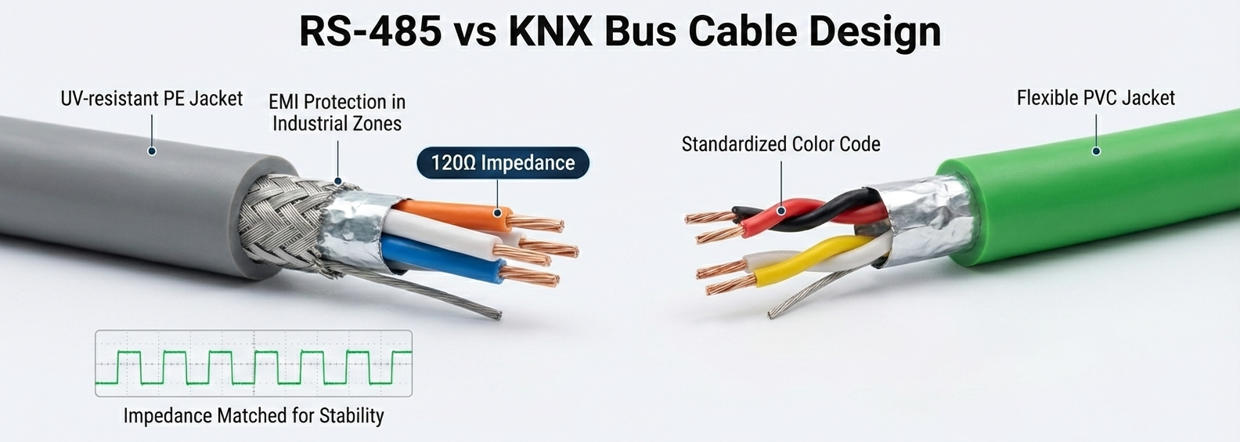
RS-485 remains a core field-bus for BMS because it supports long runs, multi-drop devices, and stable communication when the correct cable construction and routing practices are applied.
What to specify (engineer checklist)
Characteristic impedance: 120Ω (typical requirement for RS-485 networks).
Shielding: recommend shielded cable where EMI exists (elevators, VFD motors, high-power trays).
Jacket selection: indoor LSZH / riser; outdoor UV-resistant where exposed.
■ 4) KNX/EIB bus cables for smart control
KNX/EIB bus cables are designed for decentralized smart control networks—commonly used in lighting, HVAC room control, shading, and integrated smart rooms. Choosing dedicated KNX cable improves installation consistency and simplifies long-term maintenance.
Where KNX cable adds the most value
Multi-room or multi-floor automation with repeatable installation standards.
Projects that require clean documentation, fast commissioning, and easy expansions.
When you want a clear separation between control bus and IP network layers.
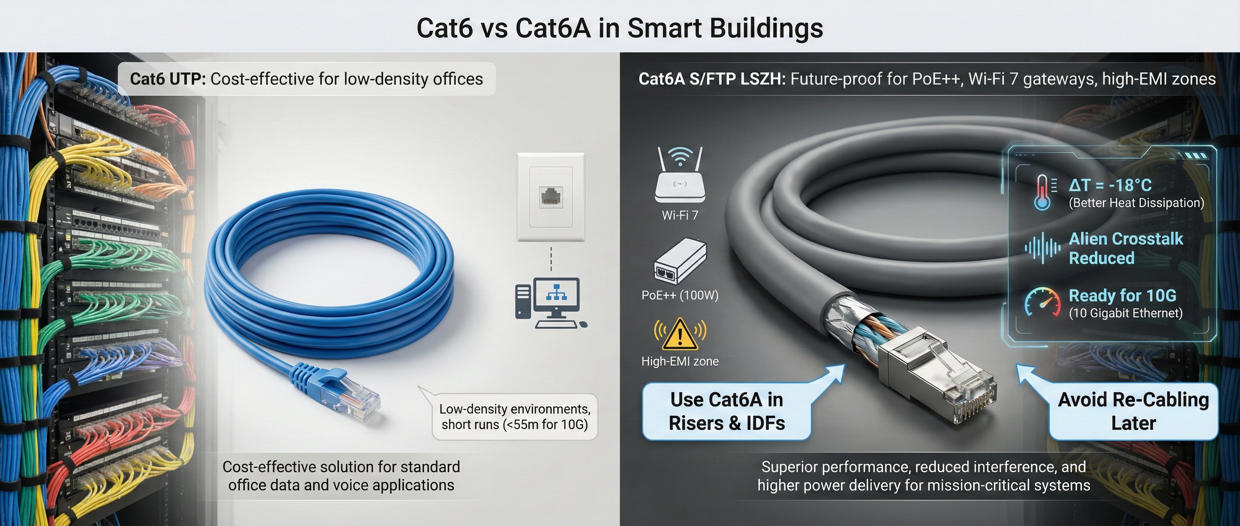
■ 5) Cat6 vs Cat6A in BMS networks
BMS increasingly includes IP endpoints (controllers, gateways, servers, IP cameras). Ethernet cabling decisions should be made based on upgrade risk, EMI environment, and expected endpoint density.
| Cable Type | Best Fit | Why Engineers Choose It | Procurement Impact |
|---|---|---|---|
| Cat6 (U/UTP) | Standard building network & BMS IP links | Cost-effective baseline for many office floors | Lower material cost; ensure pathway capacity for future upgrade. |
| Cat6A (S/FTP or shielded) | High-density endpoints, higher EMI, upgrade headroom | Better noise performance and future capacity planning | Often reduces lifecycle cost by avoiding re-cabling in risers and IDF/MDF areas. |
■ 6) Fiber backbone strategy
Fiber optics are the clean solution for backbones, long runs, and environments with significant EMI. In smart buildings, fiber is often used between floors, between buildings, and between control rooms and network closets to deliver high capacity with stable performance.
Where fiber is the default choice
Floor-to-floor backbone links (MDF/IDF interconnects).
Long corridors or campus-like building clusters.
High-noise electrical environments (EMI immunity needed).
■ 7) Decision Rules / Engineer’s Shortcut
Use this table to choose the correct cable family quickly—without over-specifying (wasted budget) or under-specifying (failure and rework risk).
| Decision Trigger | Choose | Why It Works | Typical Use | Engineer Threshold |
|---|---|---|---|---|
| Multi-drop field bus for low-speed control data | RS-485 cable (120Ω typical) | Stable for long runs and multi-device networks | HVAC, meters, access panels | If EMI exists → prefer shielded bus cable. |
| KNX/EIB automation bus layer | KNX/EIB bus cable | Designed for decentralized smart control networks | Lighting, HVAC room control, shading | Standardize jacket/color for easy maintenance. |
| IP devices or higher data rate links | Cat6 or Cat6A | Ethernet ecosystem for controllers, cameras, servers | BMS network, IP CCTV, gateways | High upgrade risk / high density → Cat6A. |
| 75Ω RF/video distribution | RG coax / RG59+Power | Impedance matching and shielding for video/RF | Legacy CCTV, CATV | Connector and braid coverage affect noise margin. |
| Backbone / long run / EMI immunity | Fiber optic + patching | High capacity, low loss, EMI-proof | Floor backbones, data rooms | Standardize connector types and labeling scheme. |
■ 8) Cost structure & risk control
The real BMS cost is not cable price per meter—it's the cost of commissioning delays, fault isolation time, and operational disruption. Build your specification around predictable performance and maintenance efficiency.
| Risk / Cost Driver | Common Root Cause | Typical Impact | Control Measure |
|---|---|---|---|
| Commissioning delays | Wrong cable substitution, inconsistent labeling, poor terminations | Extra labor, schedule slip, failed acceptance tests | Standardize families by protocol; enforce test-before-close (ceiling/wall). |
| Intermittent bus faults | EMI coupling, weak grounding strategy, shared routes with power | Hard-to-trace alarms, repeated service calls | Use shielded bus cable where needed; segregate routing near VFD/motors. |
| Upgrade re-cabling | Under-spec in risers/IDF areas; no spare pathways | Tenant disruption, high labor cost, downtime | Use Cat6A/fiber for high-risk backbones; leave spare conduits or trays. |
| Compliance rework | Unclear fire requirement or missing documentation | Delayed approvals, forced replacement | Lock requirements early; keep datasheets, routing records, test logs. |
■ 9) ZION product coverage for BMS projects
ZION COMMUNICATION provides a practical, one-stop cabling scope for BMS/BAS projects—covering life safety, control/bus communication, structured cabling, coax, and fiber backbone components.
| Category | Typical Use in BMS | ZION Scope | Link |
|---|---|---|---|
| Fire Resistant Cables | Fire alarm, voice evacuation (PAGA), emergency circuits | Fire alarm cable catalogue and project-ready options | Fire Alarm Cables |
| Control Cables | RS232 control, audio/control, security/alarm signals | Shielded/unscreened control & security cable families | — |
| BUS Cables | Field bus networking for HVAC/automation | RS-485 cables; KNX/EIB bus cables | RS-485 KNX |
| Coax (CCTV/CATV) | Video/RF distribution, CCTV coax links | RG6, RG59+Power and related coax solutions | — |
| Copper Structured Cabling | IP endpoints, switches, BMS servers and patching | Cat6/Cat6A cables + keystone, patch cords, patch panels | Ethernet Cables |
| Fiber Cabling Systems | Backbone, data room interconnects, EMI-proof links | Indoor fiber optic cable, patch panels, patch cords, pigtails | — |
■ 10) Installation & QC checklist
Execution checklist (engineer + PM friendly)
Substitution without documentation creates hidden compatibility risk.
Labeling mistakes multiply fault isolation time.
Termination quality determines long-term reliability.
Document per zone: cable type + route + endpoint list.
Segregate by noise: keep bus/signal away from high-power routes.
Test before close: continuity/polarity/link test prior to ceiling closure.
RS-485 / KNX: keep consistent cable family per segment; apply clean routing and labeling; avoid ad-hoc splices.
Ethernet: match connectors and patch components; maintain bend radius; avoid excessive pulling force.
Fire circuits: lock compliance requirement early; keep installation records and datasheets for inspection.
Fiber: standardize connector type; define patch/splice strategy and labeling from day one.
■ 11) Conclusion
Smart buildings stay “smart” only when their cabling layer is stable, maintainable, and documented. The fastest path to predictable commissioning and low lifecycle cost is to select cables by protocol (RS-485/KNX/IP/RF/fiber) and environment (EMI, indoor/outdoor, life safety), then standardize by floor/zone. If you share your building layout, maximum run length, subsystem list, and required fire performance, ZION COMMUNICATION can propose a project-ready BOM and matching cable families for your BMS deployment.