What Is the Minimum Bend Radius of G.657.A2 Fiber? Design Radius, Cable Limits, and Installation Rules
Author: Site Editor Publish Time: 03-04-2026 Origin: Site
What Is the Minimum Bend Radius of G.657.A2 Fiber?
The official minimum design radius of G.657.A2 fiber is 7.5 mm, but real installation decisions must still follow the bend-radius limit of the finished cable, not the bare fiber number alone.
G.657.A2 = 7.5 mm minimum design radius.
G.657.A1 = 10 mm, G.657.B3 = 5 mm.
For field deployment, always check the finished cable datasheet for loaded and installed bend radius.
■Direct Answer
The minimum design radius of G.657.A2 fiber is 7.5 mm. For comparison, G.657.A1 is 10 mm and G.657.B3 is 5 mm. From an engineering decision standpoint, A2 usually represents the practical middle ground: tighter bend tolerance than A1, but broader deployment comfort than B3 for many mainstream single-mode access and indoor applications.
The important boundary condition is this: 7.5 mm is a fiber classification value, not a universal finished-cable installation radius. Procurement teams and installers should still follow the cable datasheet for real loaded and installed bend-radius limits.
| Question | Fast Answer |
|---|---|
| What is the official minimum design radius of G.657.A2 fiber? | 7.5 mm |
| Is it tighter than G.657.A1? | Yes |
| Is it tighter than G.657.B3? | No |
| Can every G.657.A2 cable be bent to 7.5 mm in the field? | No |
| What should site teams follow during installation? | The finished cable datasheet |

■What “Minimum Design Radius” Really Means
In the ITU-T G.657 framework, minimum design radius refers to the bend-performance category of the fiber itself. It tells engineers how the fiber is classified for macrobending performance, which is why the standard assigns values such as 10 mm, 7.5 mm, and 5 mm to different G.657 classes.
What it does not mean is that every patch cord, FTTH drop cable, indoor cable, or pre-terminated assembly using that fiber can automatically be routed to the same number in the field. Finished cable performance depends on cable diameter, jacket structure, strength members, pulling tension, routing hardware, and whether the cable is under load or already fixed in place.
■G.657.A1 vs G.657.A2 vs G.657.B3 Radius Comparison
For buyers and engineers, the most useful starting point is to separate these three classes by bend threshold and deployment logic. A-category fibers align with G.652.D transmission and interconnection expectations, while B-category fibers are intended for more aggressive bend environments near the end of the network.
| Fiber Class | Minimum Design Radius | Compatibility Logic | Typical Selection Use |
|---|---|---|---|
| G.657.A1 | 10 mm | G.652.D-compliant family | General indoor and access routing with moderate bend constraints |
| G.657.A2 | 7.5 mm | G.652.D-compliant family | FTTH, wall outlets, building entry, denser cabinets, tighter indoor paths |
| G.657.B3 | 5 mm | System-compatible, more specialized bend-focused use | Ultra-tight short-reach bend environments near network endpoints |
■Why Bend Radius Matters in Real Installations
Bend radius matters because tighter routing raises the chance of macrobending loss, which can increase attenuation and create performance instability, especially in dense indoor environments. This is why bend-insensitive fiber exists in the first place: to reduce deployment risk where routing space is limited.
In field conditions, bend-related errors usually appear at wall boxes, subscriber outlets, cabinet turns, tray transitions, patching areas, risers, and indoor corners. Teams often assume that “bend-insensitive” means “routing discipline no longer matters.” In practice, that assumption creates avoidable rework.
Most bend-radius problems are not caused by the fiber class alone. They are caused by a mismatch between spec interpretation, cable construction, and actual routing hardware.
■Static vs Routing Considerations
For deployment work, there are two different questions: how tightly the fiber category can be classified, and how tightly the finished cable can be handled during and after installation. These are different decision layers, and mixing them leads to specification errors.
| Scenario | What to Check | Why It Matters |
|---|---|---|
| Cable being pulled | Loaded bend radius | Tension plus bending creates higher installation risk |
| Cable fixed after installation | Installed / unloaded bend radius | Final routing still affects long-term loss and strain |
| Fiber specification review | G.657 class | Tells you the bend-performance category of the fiber |
| Cable purchasing decision | Cable datasheet | Tells you what can actually be routed on site |

| Metric | Example Value | Engineering Meaning |
|---|---|---|
| G.657.A2 fiber design radius | 7.5 mm | Fiber classification threshold |
| Example finished cable, loaded bend radius | 76 mm or 160 mm | What installation hardware and pulling path must maintain |
| Example finished cable, unloaded bend radius | 51 mm or 80 mm | What final routing should still respect after installation |

■Common Mistakes and Risks
The most common mistake is reading G.657.A2 = 7.5 mm as a universal field-routing rule. That shortcut causes over-tight cabinet turns, hard clips, poor tray transitions, and avoidable troubleshooting later.
| Mistake | Why It Is Wrong | Likely Consequence | Better Rule |
|---|---|---|---|
| Using 7.5 mm as the cable installation radius | It is a fiber design value, not a universal cable-routing limit | Hidden loss, strain, later rework | Check the finished cable datasheet first |
| Ignoring loaded bend radius during pulling | Installation tension changes the safe bend limit | Damage during pull, later attenuation issues | Use loaded bend-radius values for the routing path |
| Choosing by fiber class only | Cable structure can be the real limiting factor | Procurement mismatch | Review cable OD, construction, and use conditions |
| Using tight elbows, small clips, or sharp brackets | Local stress may exceed safe handling limits | Loss increase and reduced reliability margin | Use bend-managed routing accessories |
■Decision Rules / Engineer’s Shortcut
For most engineering and procurement teams, selection should be based on deployment environment first, not the smallest headline bend number. That reduces compatibility risk and lowers rework cost.
| Project Condition | Recommended Choice | Why | Watch-Out |
|---|---|---|---|
| Moderate indoor routing, standard handling discipline | G.657.A1 | Adequate bend improvement with broad compatibility comfort | May be less forgiving in tighter routing zones |
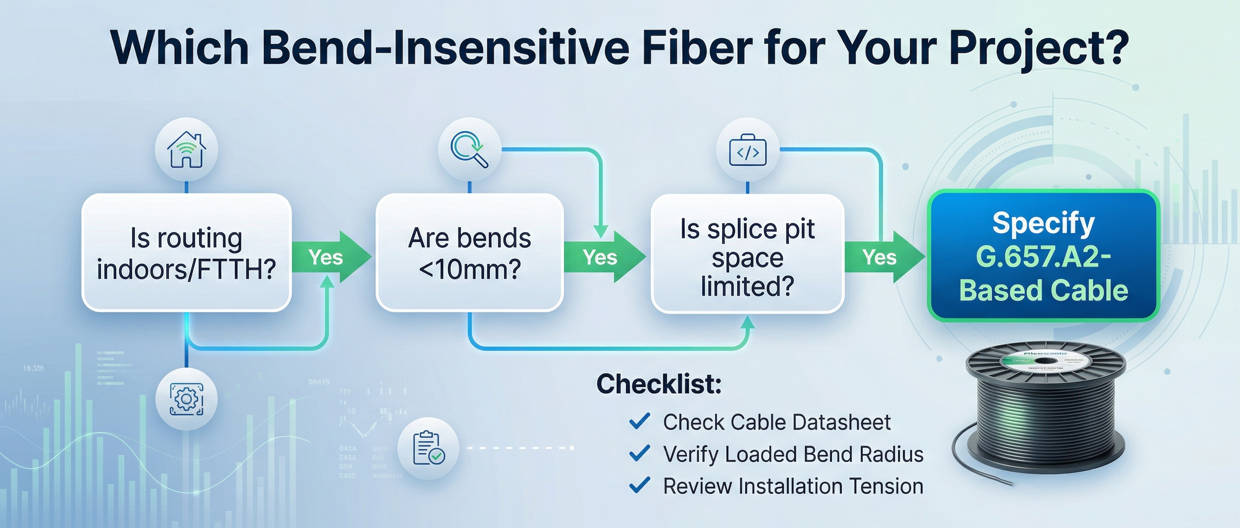
| Tight indoor corners, wall boxes, cabinets, FTTH transitions | G.657.A2 | Better bend tolerance without leaving the A-category logic | Still verify finished cable limits |
| Ultra-tight short-reach endpoint routing | G.657.B3 | Smallest design radius among the three | Use only where the deployment logic truly needs it |
| One safer all-purpose bend-tolerant option for access and building-side work | Usually G.657.A2 | Balanced decision for many real projects | Do not ignore cable structure and installation tension |
If the route includes tight indoor routing but still needs mainstream single-mode deployment compatibility, G.657.A2 is often the safest engineering default. If the route is extremely tight and very short-reach, evaluate B3. If the route is well controlled and moderate, A1 may be enough.
■When to Choose It
The route includes tight indoor corners.
You have wall outlets, transition boxes, or compact cabinets.
The project is FTTH, in-building access, or dense patching.
You want more bend tolerance than A1 without moving to a more specialized B3 decision.
A thick finished cable will determine the real routing limit.
The installation includes high pulling tension.
The purchasing team has not reviewed the cable datasheet.
The application actually requires extreme bend performance near the endpoint.
| Scenario | Is G.657.A2 a Good Fit? | Notes |
|---|---|---|
| FTTH drop and subscriber termination | Yes | Common match for bend-sensitive endpoints |
| Building-entry and riser transition areas | Yes | Useful where routing space is limited |
| Dense cabinet or wall-box routing | Yes | Often the main reason to choose A2 over A1 |
| Standard route with generous bend space | Maybe | A1 may already be sufficient |
| Ultra-tight short interconnect near endpoints | Maybe B3 is better | Depends on the true bend requirement and network policy |
■How to Read Datasheets Correctly
A good datasheet review should separate four layers: fiber class, cable construction, loaded vs installed bend radius, and actual deployment context.
Check whether the datasheet states G.657.A2, G.657.A1, G.652.D, or a combined declaration.
Confirm whether the product is a drop cable, indoor cable, indoor/outdoor cable, or pre-terminated assembly.
Find the mechanical table and look for loaded, unloaded, or installed bend-radius values.
Evaluate tray turns, elbows, brackets, clips, cabinets, wall boxes, and pulling tension before final selection.
■FAQs
1. What is the minimum bend radius of G.657.A2 fiber?
The official minimum design radius of G.657.A2 fiber is 7.5 mm.
2. Is G.657.A2 tighter than G.657.A1?
Yes. G.657.A1 is specified at 10 mm, while G.657.A2 is specified at 7.5 mm.
3. Can every G.657.A2 cable be bent to 7.5 mm during installation?
No. The 7.5 mm figure classifies the fiber. The finished cable may require a much larger bend radius, especially during pulling or under load.
4. When should I choose G.657.A2 instead of G.657.A1?
Choose G.657.A2 when the route includes tighter indoor routing, FTTH terminations, compact wall boxes, cabinets, or dense patching where more bend tolerance is useful.
5. When is G.657.B3 a better option than G.657.A2?
G.657.B3 becomes the better fit when the application genuinely requires ultra-tight bend performance in short-reach, endpoint-focused environments.
6. What is the safest rule for reading bend-radius claims?
Use the fiber class to understand the design category, but use the finished cable datasheet to determine the loaded and installed bend radius allowed in real deployment.
■Conclusion and Next Step
The shortest correct answer is simple: G.657.A2 fiber has a minimum design radius of 7.5 mm. The more useful engineering answer is that you should never use this number alone to approve routing, hardware, or procurement. Real deployment decisions must still be based on the finished cable’s loaded and installed bend-radius limits.
Request the cable datasheet, bend-radius specification, and application recommendation before purchase. This is the simplest way to reduce deployment mistakes, compatibility misreads, and rework cost.