How to Choose the Right Ethernet Cable in 2026: Cat6A, Shielding, PoE++ & Fire Ratings
Author: Will Publish Time: 19-01-2026 Origin: Site
How to Choose the Right Ethernet Cable in 2026: Cat6A, Shielding, PoE++ & Fire Ratings
In 2026, wrong cable selection can silently cap performance, increase heat risk under PoE++, and create compliance issues in commercial buildings. This guide gives a clear, engineer-friendly decision logic for choosing the right Ethernet cable for Wi-Fi 7, 10G, smart buildings, and demanding environments.
Default to Cat6A for new installs (Wi-Fi 7, 10G, PoE++ readiness).
Choose shielding by environment: UTP (clean office), FTP (PoE++ / moderate EMI), S/FTP (dense/industrial).
Match jacket to code: CMP/CMR/CM + LSZH/CPR where required.
Pick conductor right: solid for permanent links, stranded for patch cords.
■Why Cable Choice Matters in 2026
Modern Ethernet links often power devices (PoE++), feed multi-gig Wi-Fi 7 access points, and run through tighter building pathways. Choosing a “minimum spec” cable can trigger hidden costs: intermittent faults, overheating, EMI issues, and code-compliance delays.
■Why Cat6A Is the New Baseline
Cat6A is the most practical standard for new projects because it is engineered for 10G up to 100m and offers better margin for heat and crosstalk in dense pathways. For Wi-Fi 7 uplinks and PoE++ endpoints, Cat6A reduces risk and extends usable lifecycle.
■Cat5e vs Cat6 vs Cat6A (Decision Summary)
| Category | Best Fit | 2026 Recommendation | Risk If Misused |
|---|---|---|---|
| Cat5e | Legacy / basic 1G | Avoid for new builds | Early replacement / limited upgrade headroom |
| Cat6 | Shorter multi-gig runs | Only if budget + short runs are confirmed | 10G limitations, less margin under PoE++ heat |
| Cat6A | Wi-Fi 7 / 10G / PoE++ | Default baseline | Lowest long-term risk |

■UTP vs FTP vs S/FTP (Shielding Logic)
Shielding improves stability by reducing EMI and controlling noise in dense pathways. It becomes more important as PoE power and device density rise.
Clean office environments
Lower EMI exposure
Good for standard endpoints
Wi-Fi AP uplinks
PoE++ endpoints
Moderate EMI areas
Data centers, dense cable trays
Industrial / heavy EMI
Best noise control margin

■PoE++ (90W) Thermal & Safety Considerations
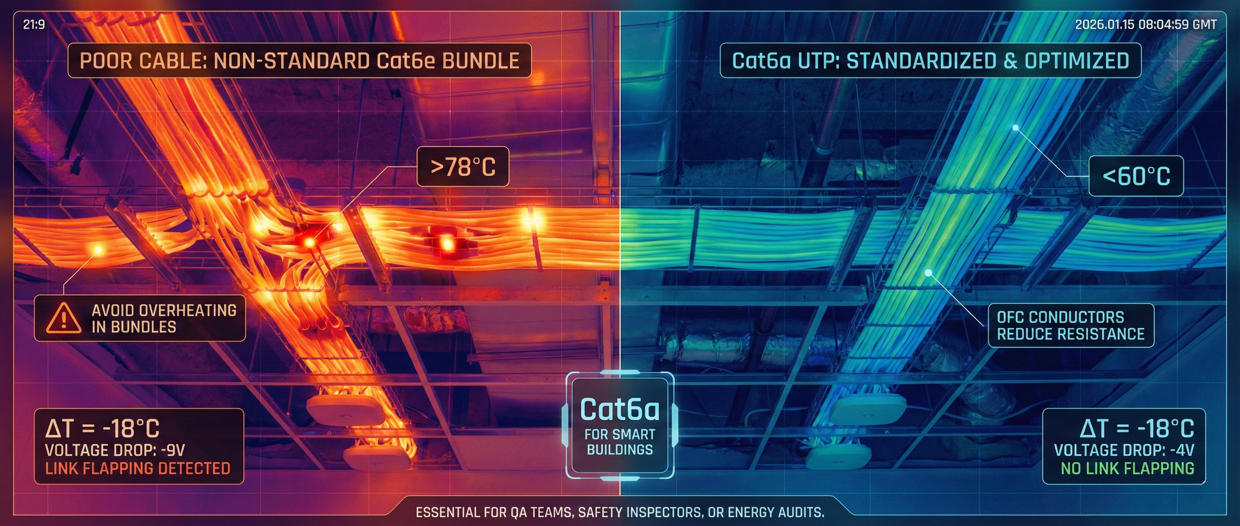
PoE++ can raise bundle temperature, especially in dense pathways. Cable quality, conductor size, and shielding/grounding practices influence thermal stability. For PoE++ endpoints, ZION recommends building extra margin: Cat6A + appropriate shielding and proper cable management to avoid heat traps.
■Fire Ratings: CMP/CMR/CM + LSZH/CPR
Cable choice is also a compliance decision. Select jacket rating based on building pathways and local codes.
CMP (Plenum): air-handling spaces above ceilings
CMR (Riser): vertical shafts between floors
CM (General): standard runs where permitted
LSZH: low smoke, zero halogen environments
CPR (EU): reaction-to-fire classes required in many commercial projects

■Solid vs Stranded Conductors
Use solid conductor for permanent horizontal cabling (better stability). Use stranded conductor for patch cords and flexible connections. Mixing these incorrectly can reduce reliability and increase maintenance.

■Selection by Application (2026 Decision Table)
| Use Case | Recommended Cable | Why |
|---|---|---|
| Wi-Fi 7 Access Points | Cat6A UTP / FTP | Multi-gig uplink + future margin |
| PoE++ Cameras / Devices | Cat6A FTP | Thermal + EMI risk control |
| Smart Buildings (BMS / IoT) | Cat6A LSZH | Low smoke safety + long lifecycle |
| Data Centers | Cat6A S/FTP | High density + best noise margin |
| Industrial / Heavy EMI | Shielded + grounded | Noise + reliability protection |
■ZION Selection Principles
If your project includes Wi-Fi 7, PoE++, or 10G planning, choose Cat6A as the baseline—and then select shielding and jacket rating by environment and code.
Better performance margin over time
Lower rework risk during expansion
Improved stability in dense pathways
Fewer overheating/EMI surprises under PoE loads

■FAQ
Is Cat6A always necessary in 2026?
For new commercial projects, Cat6A is the most future-proof baseline for Wi-Fi 7 and 10G planning. Cat6 may be acceptable only when run length and future demands are strictly limited.
Do shielded cables require grounding?
Yes—shielding is effective only when terminated and grounded properly. Poor grounding can reduce benefits and create troubleshooting complexity.
Which matters more: cable or installation?
Both. Wrong cable selection caps performance; poor installation creates instability. Use the ZION installation guide to ensure the selection performs in real conditions.
Correct cable choice needs correct installation. Read: How to Install Ethernet Cable in 2026 (Installation Guide).