Quick Answer: How Should Control Cable Be Selected Near a VFD?
Start with the circuit function and the drive or servo manufacturer's wiring instructions. Sensitive analog, feedback, and communication circuits may need twisted pairs, screening, or a dedicated cable, while ordinary digital control circuits may have different requirements. Keep these circuits away from drive input, output, braking, and motor conductors where the project design requires separation. A shielded cable is not a substitute for correct routing, bonding, and termination.
The practical purchasing question is not simply “shielded or unshielded?” It is whether the complete cable construction matches the signal, route, motion, environment, equipment interface, and EMC design. Cable family names such as CY or LiYCY can help form a shortlist, but the exact SKU and installation method determine suitability.
Why VFDs and Servo Drives Change the Cable Environment
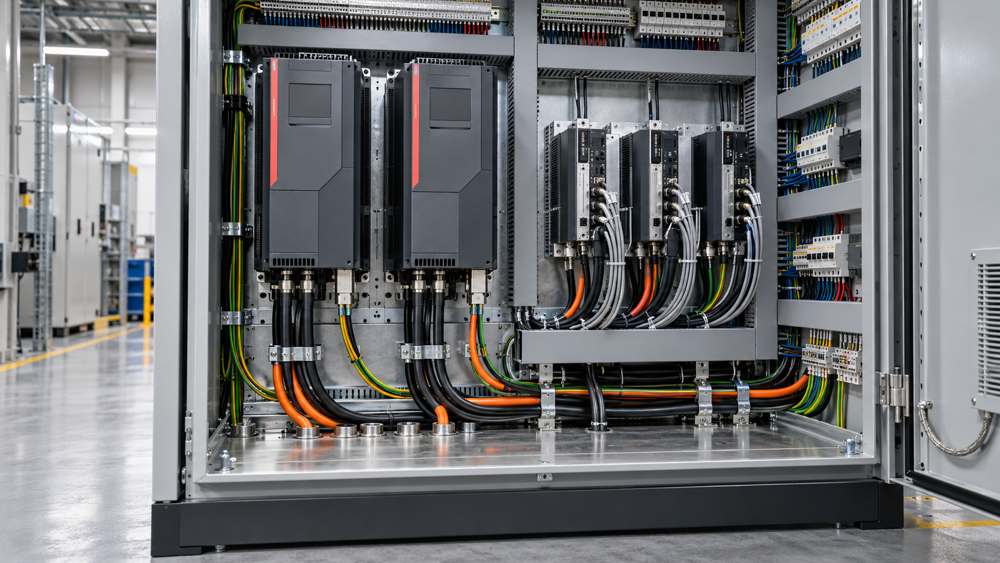
Variable-frequency drives and servo amplifiers use rapid switching to control motor speed and torque. Their input conductors, DC or braking components, output conductors, and motor connections can create conducted and radiated interference. The practical exposure at a control cable depends on the cabinet layout, route length, proximity, parallel run, crossing arrangement, bonding system, and the signal's own sensitivity.
Low-level analog references, high-impedance inputs, encoder or resolver feedback, and some communication interfaces can be more sensitive than conventional relay or interlock wiring. This is why a single cable rule cannot be applied to every conductor entering the same cabinet.
Separate Control and Feedback Wiring From the Drive-to-Motor Circuit
The most important boundary is between wiring located near a drive and the power cable that connects the drive output to the motor. A general flexible control cable must not be treated as a motor output cable unless that exact construction is specified for the duty.
| Circuit | Initial cable decision | Verify before approval |
|---|---|---|
| PLC digital enable or interlock | Follow the drive manual for screening and conductor arrangement. | Voltage, current, input specification, routing, and segregation. |
| Analog speed or torque reference | Consider a screened twisted pair when specified. | Signal type, input impedance, pair assignment, and shield termination. |
| Encoder or resolver feedback | Use the dedicated or manufacturer-approved feedback cable. | Connector, transmission requirements, screening, flex, and length. |
| External sensor | Match the sensor interface and route sensitivity. | Supply, output type, pair or core count, shield, and environment. |
| Industrial network | Use a protocol-appropriate communication cable. | Impedance, topology, segment length, connector, and installation rating. |
| VFD output to motor | Use the specified motor-duty power cable, not general CY control cable. | Insulation duty, protective-earth configuration, EMC termination, and installation conditions. |
Match Cable Construction to the Circuit and Installation
Once each circuit is identified, evaluate the cable as a complete construction. For initial sourcing, ZION's flex control cable category and flex control and data cable range provide families including LiYY, LiYCY, LiYY TP, LiYCY TP, YY, CY, and SY. Family names are useful for comparison, but they do not replace an exact datasheet review.
Confirm core or pair count, twisted-pair needs, conductor size, color or number identification, and any interface-specific construction.
Check whether a braid, foil, individual pair screen, overall screen, or a combination is required and how it will terminate.
Verify operating voltage, current, insulation requirements, relevant transmission characteristics, and equipment-interface conditions.
Distinguish fixed installation, occasional movement, continuous flex, torsion, abrasion, and minimum bend requirements.
Identify oil, coolant, moisture, chemicals, sunlight, temperature, flame-performance, and cleaning exposure.
Request model- and size-specific datasheets, declarations, test information, or approvals required by the project.
For machine-mounted sensing and termination requirements, the sensor and actuator cable range may be a more relevant starting point than a general multicore control cable.
A Six-Step Selection Workflow for OEMs and Cable Buyers
A circuit-by-circuit review reduces the risk of purchasing one generic cable family for every function in the drive cabinet.

- Obtain equipment manuals. Collect the VFD or servo manual and the documentation for connected PLCs, sensors, encoders, feedback devices, and communication interfaces.
- Classify every circuit. Label power input, motor output, braking, digital control, analog control, feedback, sensor, safety, and network circuits separately.
- Define electrical and mechanical requirements. Record voltage, current, core or pair count, conductor size, screen, movement, bend, temperature, and jacket exposure.
- Plan routing and segregation. Establish trays, ducts, cabinet entry points, parallel runs, crossings, and separation according to the equipment and project design.
- Define shield termination and bonding. Specify where and how each screen terminates, including connector or gland hardware and the bonding arrangement.
- Approve the exact cable construction. Compare the final cable datasheet with the circuit schedule, manuals, environmental requirements, and required project documentation.
Routing, Shielding, and Bonding Must Work Together
A screened cable can still perform poorly if it shares a long route with motor output conductors, has an unsuitable shield connection, or enters a cabinet through a poorly bonded path. Plan physical segregation first, minimize unnecessary parallel exposure, and follow the equipment instructions for crossings and separation distances. Where circuits must cross, the project design commonly aims to reduce the coupling length rather than letting the routes run together.
Shield effectiveness depends on the complete connection. Confirm the termination method, contact area, connector or gland, pigtail limitations, cabinet bonding, protective-earth arrangement, and equipotential conditions. Whether a shield is bonded at one end or both ends is a project-specific EMC decision—not a universal cable rule.
Record the routing and screen-termination method on the cable schedule or drawing. This gives purchasing, panel building, and commissioning teams the same installation basis.
Common Selection and Installation Mistakes
Most avoidable problems appear when the cable is selected before the circuit and route are fully defined.
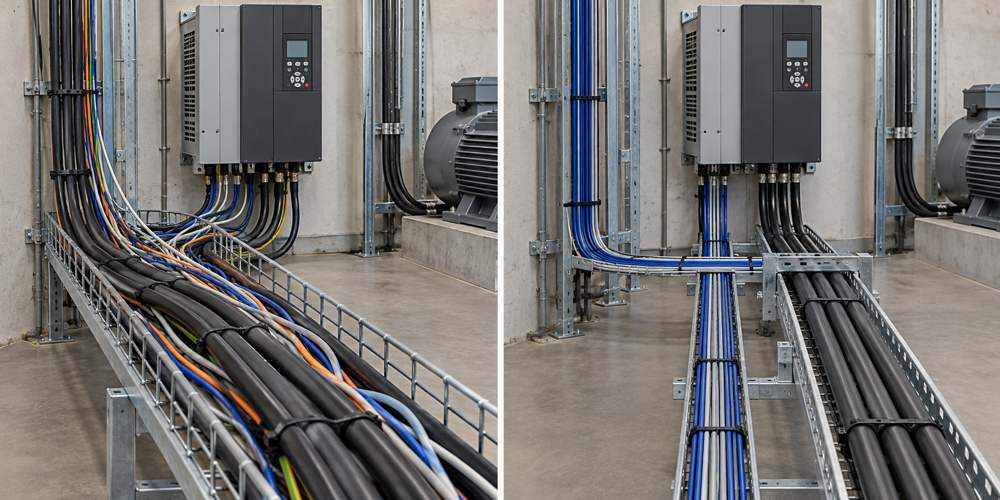
- Routing an analog reference or feedback cable alongside motor output conductors for an extended distance.
- Selecting a shielded cable without specifying the shield termination and bonding method.
- Using a generic control cable for an encoder, resolver, industrial network, or safety interface that has dedicated requirements.
- Assuming a flexible jacket automatically means the cable is approved for continuous flex, torsion, or drag-chain use.
- Choosing CY, LiYCY, or another family name without checking the exact conductor, screen coverage, voltage, temperature, jacket, and documentation.
- Expecting ferrites, filters, or software smoothing to correct a routing or bonding problem without investigating the complete installation.
Information Needed Before Requesting a Cable Recommendation
A complete enquiry lets the cable supplier distinguish a general control-cable requirement from a feedback, communication, continuous-flex, or motor-duty application. Include the following fields in the RFQ or technical schedule:
| RFQ field | Information to provide | Why it matters |
|---|---|---|
| Application and circuit | Machine type, circuit function, signal or interface, and connected equipment models. | Establishes whether the need is control, feedback, sensor, network, safety, or motor power. |
| Electrical requirements | Rated voltage, operating current, core or pair count, conductor size, and interface requirements. | Defines the basic electrical construction and circuit compatibility. |
| Shield and termination | Required screen type, termination method, bonding plan, gland or connector details. | Connects cable construction with the project EMC design. |
| Route | Length, cabinet entries, parallel exposure, crossings, tray or duct, and separation constraints. | Shows the interference environment and installation limitations. |
| Mechanical duty | Fixed, occasional movement, continuous flex or torsion, plus bend and travel conditions. | Prevents fixed-installation cable from being used for an unsupported motion duty. |
| Environment | Temperature, oil, coolant, moisture, chemicals, sunlight, abrasion, and flame-performance needs. | Determines jacket and installation suitability. |
| Commercial and quality | Quantity, destination, required standards, approvals, tests, documents, drawing, and existing cable datasheet. | Supports model-level review and quotation preparation. |
Use ZION's control cable category to review relevant product families, then compare the selected model documentation with the completed schedule before approval.
Frequently Asked Questions
Is CY cable suitable near a VFD?
CY cable may be a candidate for some control circuits, but suitability depends on the exact cable construction, circuit function, route, shield termination, environmental conditions, and the drive manufacturer's instructions.
Should a control cable shield connect at both ends?
There is no universal rule for every installation. Follow the equipment manuals and project EMC design, then confirm the bonding and equipotential conditions at both endpoints.
Can a flexible control cable be used from a VFD to a motor?
Do not select a general flexible control cable for the drive-to-motor circuit unless the exact cable is designed and approved for that duty. The motor output cable must meet the drive and motor requirements for insulation, protective-earth arrangement, EMC termination, and installation conditions.
What information should be sent for cable selection?
Provide the circuit function, equipment models, voltage and current, route length, core or pair count, conductor size, shielding and termination requirements, jacket environment, temperature, movement, bend limits, standards, quantity, destination, and any drawing or existing cable datasheet.



 Fiber Optic Cable
 Fiber Optic Tools
 Ethernet Cable
 Coaxial Cable
 Fire & Security Cable
 Voice, Audio & Video
 Power & Control Cable