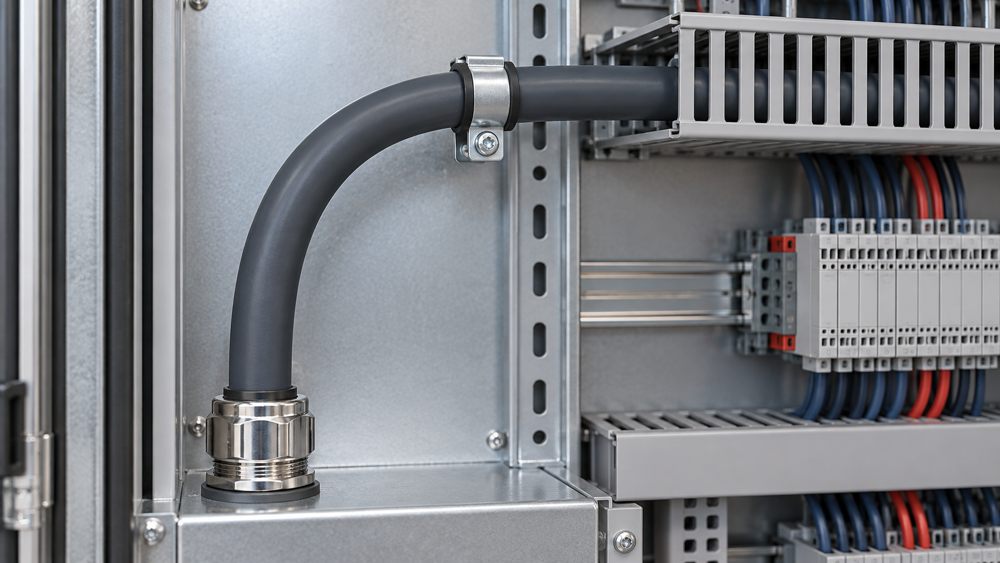
Quick Answer: How Do You Calculate Control Cable Bend Radius?
Find the finished cable outside diameter D and the applicable bend factor k from the exact product documentation. Calculate minimum bend radius as R = k × D. Use the factor for the actual condition—fixed installation, installation under tension, or continuous movement—and design a larger radius where the available space allows.
Do not substitute conductor diameter for overall cable diameter or apply one factor to every cable in a family. Diameter, construction, shielding, armor, conductor count, jacket, and movement rating can all change the result.
Bend Radius Formula, Cable Diameter, and Reference Point
Cable outside diameter is the finished width across the complete cable. Bend radius describes the size of the curve. Manufacturers normally express the minimum allowable radius as a multiple of outside diameter, but drawings and data sheets should make the measurement convention clear.
| Input | What it means | What to verify |
|---|---|---|
| Outside diameter D | Finished diameter across the complete cable. | Exact model and size; nominal versus maximum stated diameter. |
| Bend factor k | Manufacturer-specified multiplier for a defined condition. | Fixed, installation, or dynamic condition and any temperature limits. |
| Radius R | Required size of the cable curve according to the stated convention. | Reference line, available route space, and nearby hardware. |
Worked Example: Interpreting a k × D Requirement
Assume a hypothetical cable has a verified outside diameter of 12 mm and its exact data sheet specifies a fixed-installation factor of 6 for the intended condition.
The result does not establish a 6D rating for any ZION cable. For an actual design, use the diameter and bend factor published for the selected model, conductor size, and installation state. If the data sheet provides a diameter tolerance, determine whether the maximum finished diameter is required for layout planning.
Why Installation State Changes the Bend Requirement
A cable resting in its final position does not experience the same forces as a cable being pulled around a corner or repeatedly flexed inside a carrier. The correct factor must match the state in which the cable will be handled and operated.
| Installation state | What changes | Data to obtain |
|---|---|---|
| Fixed after installation | The cable remains supported after placement. | Fixed-installation minimum bend radius and support requirements. |
| Pulled around a corner | Tension and sidewall pressure can add stress during installation. | Installation-under-tension radius, pulling limit, and corner guidance. |
| Occasional flex | Door, service, or maintenance movement may repeat but is not a continuous carrier duty. | Permitted flexing condition, radius, frequency, and support method. |
| Continuous movement | Speed, acceleration, travel, cycles, and cable guidance affect service life. | Verified dynamic radius and complete motion limits for the exact cable. |
| Cold installation | Jacket and insulation flexibility can decrease at low handling temperature. | Minimum installation or handling temperature and any adjusted radius. |
Where to Check Bend Radius in the Actual Cable Route
Measure the physical route, not only the centerline shown on a drawing. The tightest bend often appears at a cabinet entry, connector exit, tray transition, clamp, or service loop after adjacent cables and hardware occupy their final positions.

- Cable glands and connector backshell exits
- Enclosure edges and internal wire-duct transitions
- Tray elbows, vertical drops, and conduit entries
- Clamps, ties, and the first support after a termination
- Service loops and maintenance access zones
- Adjacent cables that reduce usable bend space
- Moving carriers and transition points at both ends
- Temporary installation paths used during pulling
Allow enough straight length after a gland or connector before the cable begins to curve. Clamping and strain relief should support the cable without flattening the jacket or forcing a localized kink.
Static Bend Radius Is Not a Continuous-Flex Rating
Meeting a static bend radius does not establish drag-chain or cable-carrier suitability. A continuously moving cable requires a construction designed and verified for repeated motion, along with an application radius that matches the manufacturer's dynamic data.
Travel, speed, acceleration, cycle rate, and total expected cycles define the mechanical duty.
Guidance, free space, cable position, support, and transition geometry affect how the cable moves.
Temperature, oil, chemicals, abrasion, and torsion can change the suitable construction and radius.
When movement is part of the application, compare the duty against the exact cable documentation instead of relying on the word “flexible.” The Flex Control Cable category and Flex Control Cable / Data Cable product list can support an initial family shortlist, but dynamic limits remain model- and size-specific.
Common Bend-Radius Mistakes and How to Avoid Them
| Common mistake | Why it causes problems | Corrective action |
|---|---|---|
| Using conductor diameter | It understates the size of the finished cable. | Use the exact overall cable diameter from the product data. |
| Applying one factor to a whole family | Different sizes and constructions can have different diameters or limits. | Check the selected model, core count, conductor size, and installation state. |
| Using a fixed radius in a cable carrier | Static placement does not represent continuous mechanical duty. | Obtain the verified dynamic radius and motion limits. |
| Bending immediately after a gland | The cable can kink or load the termination and strain relief. | Provide adequate straight length and support before the curve. |
| Checking only the drawing | Clamps, adjacent cables, and hardware reduce real available space. | Inspect the installed centerline and the tightest physical location. |
Select the Cable Before Finalizing the Route
Cable construction and routing space should be evaluated together. More conductors, a different conductor size, shielding, armor, jacket material, or a dynamic design can change the overall diameter and minimum radius. A route approved for one candidate may not fit another.
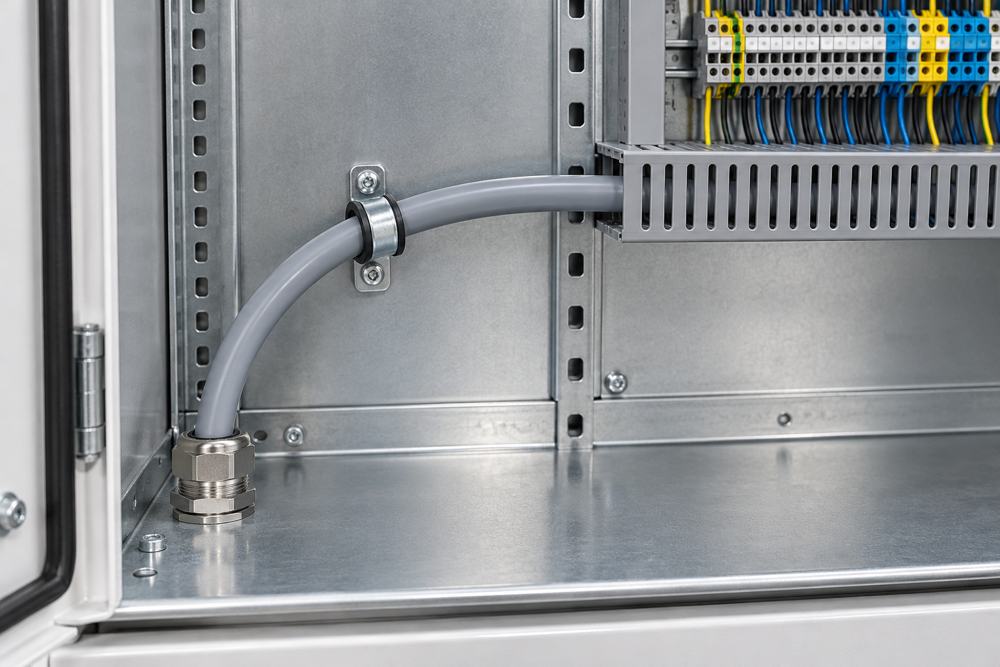
For machine-side terminations, the confirmed connector, overmold, and device entry can also control the available curve; use the Sensor & Actuator Cables range only after those interface requirements are known. The broader Control Cable product category provides a starting point for comparing cable families.
Information Needed to Confirm Bend Radius and Cable Selection
Send enough project information to identify the exact cable and its real mechanical duty. A supplier cannot verify bend radius from a family name alone.
- Application, machine, and circuit function
- Exact candidate cable or existing cable datasheet
- Core or pair count and conductor size
- Nominal and maximum finished outside diameter
- Fixed, installation, occasional-flex, or continuous-motion state
- Route drawing with glands, elbows, clamps, and available space
- Travel, speed, acceleration, cycles, and torsion where applicable
- Temperature during installation and operation
- Oil, chemicals, abrasion, UV, moisture, and other jacket exposure
- Standards, approvals, quantity, destination, and required documents
Record the approved minimum radius, measurement convention, installation state, and any required straight lengths on drawings and inspection documents. This makes the requirement usable by purchasing, panel building, installation, and maintenance teams.
Frequently Asked Questions
Can I use a larger bend radius than the specified minimum?
Yes. A larger radius generally reduces bending stress when it fits the route and does not create another installation problem such as poor support or excessive slack.
Does meeting the static bend radius prove drag-chain suitability?
No. Continuous-flex suitability also depends on cable construction, verified dynamic radius, speed, acceleration, travel, cycle duty, support, and environment.
Should bend radius use conductor diameter or cable outside diameter?
Use the finished cable outside diameter specified for the exact product, not the conductor diameter. Check whether the calculation should use a nominal or maximum diameter.
Where should cable bend radius be checked in a machine?
Check glands, connector exits, enclosure edges, tray elbows, service loops, clamps, moving carriers, and any point where adjacent cables or hardware constrain the bend.



 Fiber Optic Cable
 Fiber Optic Tools
 Ethernet Cable
 Coaxial Cable
 Fire & Security Cable
 Voice, Audio & Video
 Power & Control Cable